



Using Google Fonts in RoboHelp 2015 / CSS Formating
Hey there,
I am trying to make use of Google Fonts in a RoboHelp 2015 doc and have tried what has been suggested here - Adobe RoboHelp: Use Custom Fonts | WvanWeelden.eu and have followed the steps detailed, however have not been successful.
I am on a Mac that has "Parallels / Win 10" installed and have checked that the fonts are installed locally in Windows (they are) and have also added them to the Baggage file as instructed.
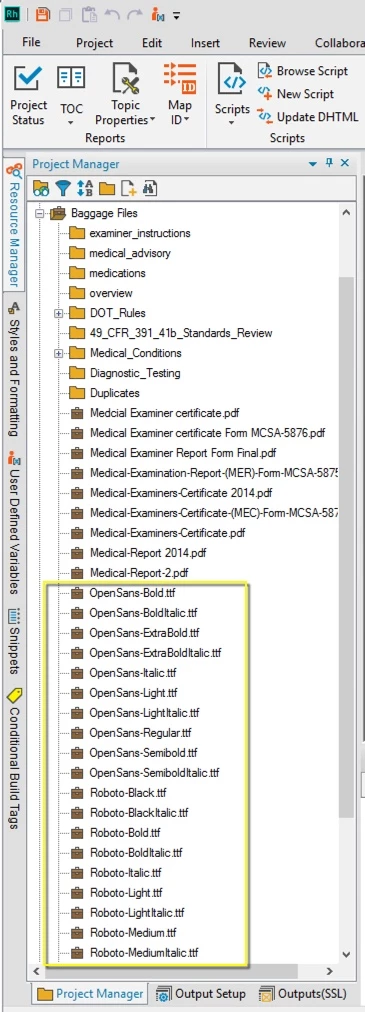
These fonts however do not show up Edit/Character dropdown as a selection... Like I have said, they are installed in the Win Fonts folder.
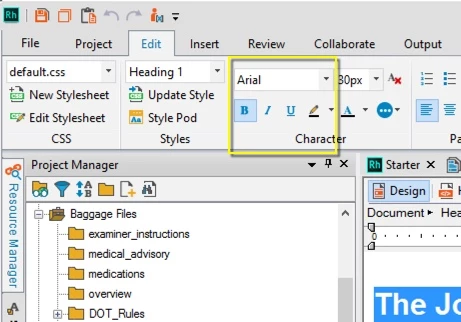
Seems that something is not right here and I am hoping someone can shead some light on this for me.
The other issue that I am having is related to the use of "Google Fonts" and the error message that I am getting when loading the RoboHelp file.
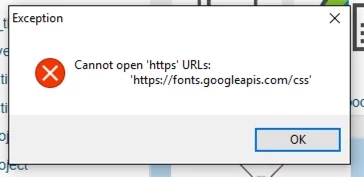
I have added the "@import" link to the very top of my default css file as described in the Adobe RoboHelp: Use Custom Fonts | WvanWeelden.eu tutorial and have directly made use of the @1552174 code generated by Google Fonts;
@1552174 url(https://fonts.googleapis.com/css?family=Roboto:400,500,700|Open+Sans:400,600);
I am not sure if we are able to make use of Google Fonts in RoboHelp? Has anyone else made use of Google Fonts?
Another question I have relates to the use of "Inline Styles"
The file that I am working on has been supplied by a client and has extensive use of inline css styling and I am wondering if when exporting to either "Responsive HTML5 / Web Help" type files this is overwritten by the selection made as shown below;
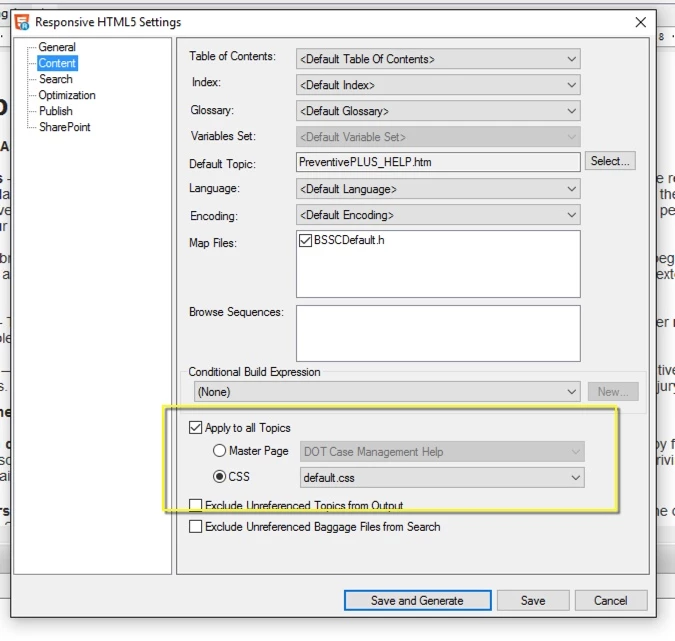
Or if in fact these inline styles need to be stripped out of each page in the document (over 700). Any advice relating to these matters would be greatly appreciated.
Cheers
Brendon
 AdChoices