
Participant
January 10, 2024
Question

Utilisation d'un template sortie Word ou PDF

  • January 10, 2024
  • 4 replies
  • 211 views

Bonjour

Je cherche a faire un "template" pour une sortie PDF ou Word afin d'avoir une page de couverture, un pied de page, une intro etc 

J'ai reussi a passer par "Maquettes" pour le pied de page et l'entete
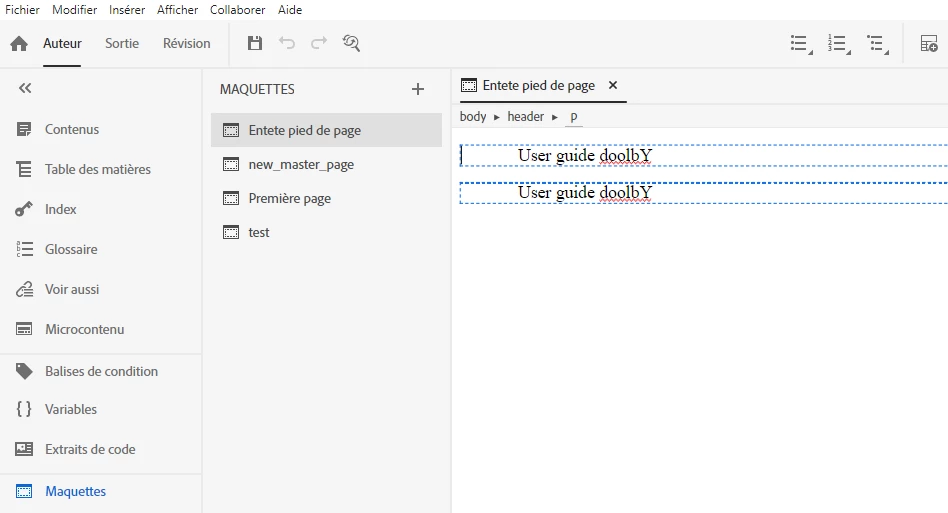
Mais je n'arrive pas a faire cela pour une page de garde et une intro

J'ai lu qu'il fallait passer par "Sortie" - "Habillages" mais je ne peux pas ajouter d'habillage word ou PDF 
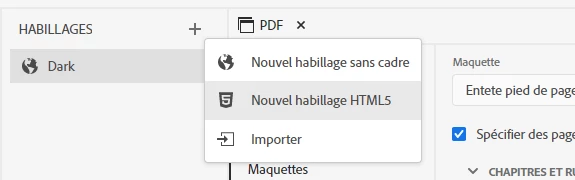
Quelqu'un pourrait m'aider svp? 


Merci 

    This topic has been closed for replies.

    4 replies

    Community Expert
    January 10, 2024

    In RH2020 you use master pages to set up the headers and footers, then select the correct master pages in the output preset.

    https://www.grainge.org/RoboHelp_Tour/rh2020/authoring/master_pages.htm

    https://www.grainge.org/RoboHelp_Tour/rh2020/outputs/outputs_pdf.htm


    The cover page is an htm file in your project (maybe place it under assets in a folder called front_matter to keep things neat). You select it using the options available in the Book TOC toc format.  If you only have an Online TOC, you'll need to create a Book TOC formatted toc to see the options.  For an Intro page, I think you would follow the same process as cover page, but insert it using the third option in the menu, but I haven't tried this myself

    https://www.grainge.org/RoboHelp_Tour/rh2020/toc_index_glossary/toc.htm


    Peter Grainge
    Community Expert
    Community Expert
    January 10, 2024

    That is the last update to 2020 so you are on the latest update for that version. 2022 introduced templates to replace skins and they have more control over the various parts of the output. You can see how at RH2022 PDF Templates (grainge.org).


    However, that's a learning curve so let's see what can be done in 2020. You said you can't create a new skin but didn't tell me why. If it is as simple as you don't know how, see the screenshot below.


    ________________________________________________________

    My site www.grainge.org includes many free Authoring and RoboHelp resources that may be of help.


    Use menu (bottom right) to mark as Best Answer or to Highlight particularly useful replies. Found the answer elsewhere? Share it here.
    Participant
    January 10, 2024

    I am on the latest version I think 


    Peter Grainge
    Community Expert
    Community Expert
    January 10, 2024

    You haven't said which version of RoboHelp you are using. Please always start a thread with this information. Please go to Help > About and include the full version number.


    In this case the answer is dependent on the version.


    Also explain why you cannot create a new skin (template in later versions).

    ________________________________________________________

    My site www.grainge.org includes many free Authoring and RoboHelp resources that may be of help.


    Use menu (bottom right) to mark as Best Answer or to Highlight particularly useful replies. Found the answer elsewhere? Share it here.