
Inspiring
November 21, 2013
Question

View Selected Item now displays a dialog instead of automatically opening a topic in view mode.
  • November 21, 2013
  • 1 reply
  • 1219 views


View Selected Item now displays a dialog instead of automatically opening a topic in view mode. How do I set a default browser for this and stop the dialog from displaying. Using RoboHelp version 10.0.1.292 .

This topic has been closed for replies.

1 reply

Peter Grainge
Community Expert
Community Expert
November 21, 2013

Exactly where are you seeing View Selected Item?


See www.grainge.org for RoboHelp and Authoring tips

@petergrainge

Use the menu (bottom right) to mark the Best Answer or Highlight particularly useful replies. Found the answer elsewhere? Share it here.
Inspiring
November 21, 2013

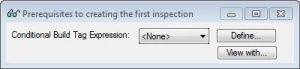
On View menu, it’s the “View Item” option with the eyeglasses icon. On the toolbar, it’s the eyeglasses icon with a tooltip that says “View Selected Item.”

Clicking one of these options, now displays a dialog as shown. It used to just automatically pull up the preview window for a topic.

Captiv8r
Legend
November 21, 2013

Hi there

From your image it would appear that all you need to do is grab a corner of the window and stretch it larger with your mouse. I'm guessing that you have already tried that with no success?

Cheers... Rick