February 23, 2012
Question

Volume Label syntax error

  • February 23, 2012
  • 2 replies
  • 1898 views

While trying to compile after making edits I received the following prompt:
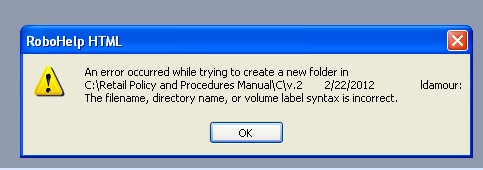
As a result it is causing the system to close out on me.

I've tried removing the .cpd file and compiling again: no results

It took me a while to locate (using Version Control) but I believe it's referring the the folder below:
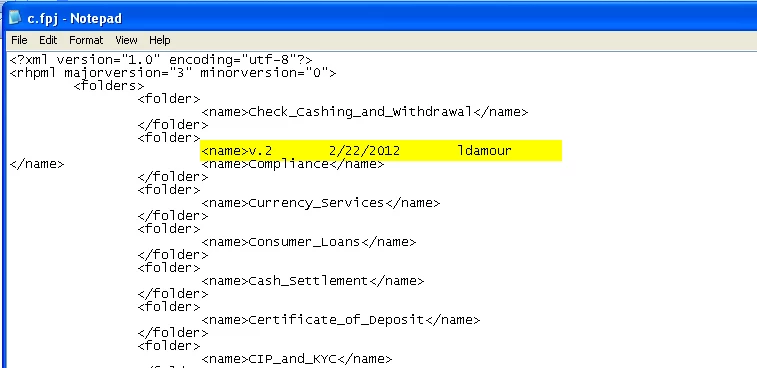
I tried to edit in Notepad to remove the highlighted text above then once again removed the .cpd file then attempted to open the project again to no avail. Prior to this last step I was unable to even open the project.  It will allow me now to open but I continue to get the same prompt and loop.

Please help.  I'm a bit of a novice with this program.

    This topic has been closed for replies.

    2 replies

    Anjaneai_Srivastava
    Adobe Employee
    Adobe Employee
    February 23, 2012

    Hi,

    In addition to what Jeff added, which totally is a valid point.

    Looking at a glance to the CSS, I notice one anomaly, there is no corresponding closing tag (</name>) for V.2 2/22/2012 ldamour . I guess may be you removed that while editing manully??

    If not, It's worth a try.

    What is the SSL oputput you are using, try checking the compilation, for any other out put too!

    Thanks,

    Anjaneai

    Captiv8r
    Legend
    February 23, 2012

    Hi Anjaneai

    I think the closing tag is present. It appears to have wrapped to the next line.

    Cheers... Rick

    Helpful and Handy Links

    Captivate Wish Form/Bug Reporting Form

    Adobe Certified Captivate Training

    SorcerStone Blog

    Captivate eBooks

    Anjaneai_Srivastava
    Adobe Employee
    Adobe Employee
    February 23, 2012

    lol ! Right Rick! Feeling like stupid at my advise now!

    Jeff_Coatsworth
    Community Expert
    Community Expert
    February 23, 2012

    Whoa! That's got way too much stuff in it for a valid path - you need to get back to basics. Your project should be in a c:\projects\[project_name]\ folder. Keep the name simple - no spaces or weird characters.

    February 23, 2012

    The project was inherited, I had no control over the inital set up.  We've been using this (project/filename) for years without issue.