
Participating Frequently
December 2, 2013
Question

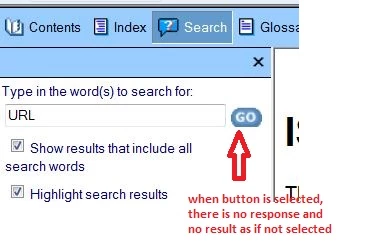
Web help search button does not work

  • December 2, 2013
  • 1 reply
  • 875 views

Web help search button does not work-All previous posts related to this issue have no resolution.

Generate\save a project in System 1  search works and Generate\save a project in System2 search fails

System 1 (win7-robohelp installed- admin-browser security tab enabled) --search function finds results with entry in search box and selecting GO button.

System 2 (win7- robohelp installed - user- browser security tab not available) - search function finds no results with entry in search box and selectin GO button.

Any suggestions? Does robohelp need to eun as admin to work correctly? What security tab functions could affect robohelp? Could this be a java issue?
This topic has been closed for replies.

1 reply

Jeff_Coatsworth
Community Expert
Community Expert
December 2, 2013

Not really anything to do with RH itself – it’s more a function of what browser is being used with the WebHelp; are the two machines running the same browsers with the same settings?

Participating Frequently
December 2, 2013

Both run same browsers (IE9). Can browser settings have an affect robohelp when a webhelp layout is saved and generated ?

If save/generate system1-- search works

If save/generate  system2-- search does not work

Jeff_Coatsworth
Community Expert
Community Expert
December 2, 2013

No, the browser has nothing to do with how RH creates the help; it has a lot to do with how the help behaves when you go to use it. Try this – on system 1, generate the help; then copy the \!SSL!\WebHelp\ folder to the second machine; open the WebHelp index page & see if the Search works; if it doesn’t, check the browser’s Internet Options to make sure that all scripts can run.