

Den DiMarco
Inspiring
July 10, 2020
質問

Web help: TOC, Index and Search are not showing in Chrome or Edge

One of our help projects, built with RoboHelp 2015, uses the output of web help. When using Internet Explorer 11, the help pages, table of contents, index and search are all displayed properly. But with Chrome or Edge, the pane for TOC, index and search contains no infomation. (See attachment.)
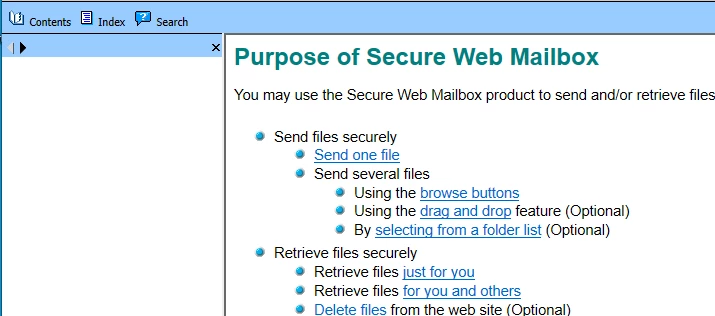


We upgraded to Robohelp 2019, but find the new RoboHelp is different enough, that for occasional users like us, it's not clear what I need to do to fix this problem. I have not been successful in finding solutions though web searches at Adobe or in general.


Can someone offer step-by-step guidance on how to display the contents for the TOC, Index and Search tabs? 


Thanks!

    このトピックへの返信は締め切られました。

    返信数 16

    Jeff_Coatsworth
    Community Expert
    Community Expert
    July 10, 2020

    Re: Buttons - it looks like it's at the top when composing, but when posted it's down in order at the bottom.


    Ok, so you can scrap the upgraded version of the project with no wories - good. You indicate that you did do the last upgrade of the project via RH2019 Classic - but I suspect it was an earlier version of RH2019 Classic, right? One of the patches - 12? - 13? - had issues when dealing with upgrading older Classic projects; that's why I suggested using the latest patch version and try again. Peter might have some advice about checking/fixing the project at the RH2019 Classic phase before proceeding to the New UI. I'm not sure what you ran into before, is - without rooting around in the project. It might or might not be needed to be fixed before proceeding.

    Den DiMarco
    Den DiMarco作成者
    Inspiring
    July 10, 2020

    Thanks, Jeff. I used the blue reply button for this reply. It puts me at the top, far away from your reply!

    Anyway, back to the issue, as you say.

    Any new info I may have entered would be insignificant. I can proceed with whatever is the best recommended route. When you say "you can scrap this version and upgrade again.", I believe you're referring to the project, right? Not the RoboHelp Software?


    If so, then is there a preferred set of steps to follow to upgrade the project? I ask becasue when I first used RoboHelp 2019 Classic to upgrade (however I did it) my project, the resulting pages looked visually corrupted, with "double-red boxes" visible at the top left and bottom left as indicated by the green arrows below. So I've decided to ask for help to try to get my original "Missing TOC, index and Search" issue resolved.


    Thank you for your patience and your help.


    Jeff_Coatsworth
    Community Expert
    Community Expert
    July 10, 2020

    Re: Reply buttons - blue will place your response in the thread in order at the bottom; black will nest your reply out of chronological order with the response it's replying to. It's easier to follow what's the latest response when the conversation unspools sequentially in chronological order.

    Back your your issue - are you saying that you upgraded the project a month ago and have added new content to the RH2019 New UI project? If so, you may have to wade though what's gone wrong in the current version of the project. If you haven't, and are just getting around to playing with it after a month, then no problem - you can scrap this version and upgrade again. However, you probably should try going via RH2019 Classic first & then change the project over to New UI.

    Peter Grainge
    Community Expert
    Community Expert
    July 10, 2020

    When you upgrade from Classic to New UI, your Classic project is left untouched. It's there in it's old format and still usable in Classic or you can upgrade again.


    It's explained in the RoboHelp Reimagine sample project.


    Use the menu (bottom right) to mark the Best Answer or Highlight particularly useful replies. Found the answer elsewhere? Share it here.
    Den DiMarco
    Den DiMarco作成者
    Inspiring
    July 10, 2020

    Peter, 

    I understand that when I upgrade RoboHelp no project should be touched. But if I upgrade a project, is the origuinal project left intact and a new one created/copied?


    I'm not sure what you mean by "or you can upgrade again." Are you saying I could upgrade the project again (non-destructively)? If so, what would be the advantage of doing that? And what specific staeps would I perform to upgrade a project non-destructively?


    It's been a month, but I did look at most, if not all, of the reimageind tutorial. While I didn't remember every detail :-), I thought I needed more information so I subsequently purchased a tutorial from IconLogic. I haven't finished that because of other higher priority tasks, so I don't consider myself as knowledgable with RoboHelp yet as I want to be.


    As to your blue reply vs. the black reply recommendation: The black reply appears to be placing subsequent entries at the bottom of the conversation. Does the blue reply put the replies at the top?


    Thank you for your help.

    Jeff_Coatsworth
    Community Expert
    Community Expert
    July 10, 2020

    Ok, good - now how did you get the project into 2019 New UI?
    Did you just start RH2019 New UI and open up the RH2015 project and have it upgrade it? (you made a backup copy of the RH2015 project before doing any of this, right?)

    Den DiMarco
    Den DiMarco作成者
    Inspiring
    July 10, 2020

    Well, since I did that inbetween other tasks, and this was about a month ago, I don't remember those details clearly. At the time I made an assumption that RoboHelp would not overwrite the original project, so I had not made a backup. But afterwards, I made a backup of a slightly older project - maybe only two pages different. That project name is SWMB RH2013 V2.7.1.2.xpj.

    Jeff_Coatsworth
    Community Expert
    Community Expert
    July 10, 2020

    First, is your RH2019 all patched up? Next, did you upgrade directly from RH2015 to RH2019 New UI or through RH2019 Classic?

    Den DiMarco
    Den DiMarco作成者
    Inspiring
    July 10, 2020

    Jeff, I just applied the current update, so I have version 2019.0.14. I'm still learning how to use RoboHelp 2019.


    Not sure how to best answer your second question, but I'll tell you this.


    - RobolHelp 2015 is still on my computer

    - I can start RobolHelp 2019

    - I can start RoboHelp 2019 classic.


    Thanks.