
WebHelp Bold Formatting Display Different in IE 9 Display
We are displaying generated WebHelp system in an IE 9 browser, so different than before when our system ran in IE 7. We are using RH 8. In IE 7 browser, bold formatting displayed as expected as it appeared in the project and our system. But our system to which the WebHelp is integrated is now running in an IE 9 or IE 10 browser.
But now the bolding of words displays differently in IE 9 browser, depending on whether the HTML code is "<p style="font-weight: bold;">" [followed by a <span style="font-weight: normal;"> further in the paragraph], OR "<p><span style="font-weight: bold;">". It is a noticeable difference - with the font-size appearing larger.
In the project, for example, the HTML code is:
<p><span style="font-weight: bold;">Threshold</span> - The criteria associated
with the alert message. </p>
<p style="font-weight: bold;">Request Date - <span style="font-weight: normal;">The
date and time when the alert request was added to the queue.</span></p>
<p style="font-weight: bold;">Scheduled Date - <span style="font-weight: normal;">The
date and time when the alert request will be processed</span><span style="font-weight: normal;"> </span>
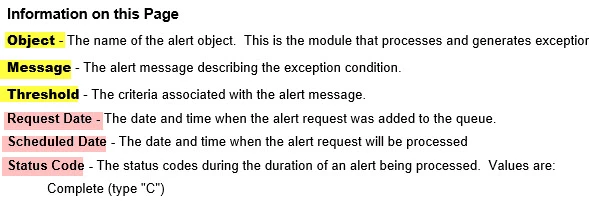
In the generated WebHelp topic displayed in IE 9 browser, I did a View Source on the topic to troubleshoot. What I see that's different is that somehow an additional "<b>" tag got added to the bolded text that was formatted with "<p><span style="font-weight: bold;">. So the View Source now looks like this:
<p><span style="font-weight: bold;"><b>Threshold</b></span>
- The criteria associated with the alert message.
</p>
< p style="font-weight: bold;">Request Date - <span style="font-weight: normal;">The
date and time when the alert request was added to the queue.</span></p>
Somehow this discrepancy in the HTML coding of the bold formatting got resolved correctly in IE prior to IE 9. As you can imagine, to correct this manually throughout a Help project with hundreds of topics would take an enormous effort on my part. The correct display is formatted with the <p> tag containing the style attribute of bold.
As suggested in other threads, I checked my CSS, and the <p> tag has "font-weight=normal". So, as far as I can tell, it's not the stylesheet - though I would love a global solution like that. Also, the same bolding issue is happening on text within paragraphs.
So, I'm desperate here!! Please help with any solutions, as soon as you can.


 AdChoices