
January 29, 2013
Answered

WebHelp in RoboHelp 10 - Books are not opening in the published files

  • January 29, 2013
  • 2 replies
  • 4470 views

Projects that were published in RoboHelp 9 using WebHelp have not been working properly since upgrading to a 64 bit laptop.  The published project opens fine and the first book will expand but will not collapse.  No other books within the project will expand or collapse.  Any topics not nestles into a book will display properly.  Since then I have upgrade to Technical Communication Suite 4 and am using RoboHelp 10.0.0287 with the same results.  I am using Windows Internet Explorer 8.0.7600.6385.  Projects published in FlashHelp in RoboHelp 9 and 10 have had no issues.  Can you tell me how to resolve the issue?
This topic has been closed for replies.
Correct answer sRankin99

Hi John,

I'm glad to hear I'm not the only one having this issue.  I am sorry to hear your client is having this issue.

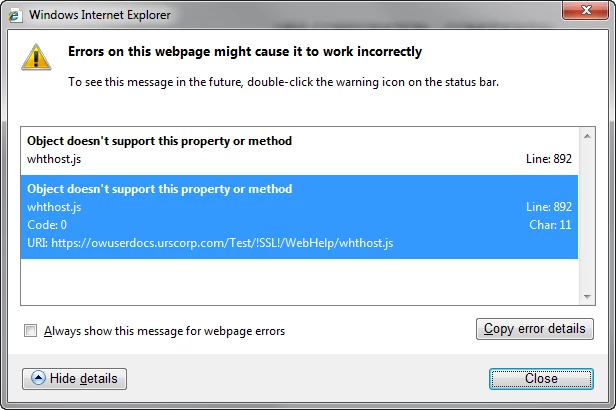
Yes, I do get the same error message as you do.  On the same line and Character.

The IT group has tested this issue on Firefox and the project works properly.  They are going to test Google Chrome tomorrow.  I will post their findings as well and pass along any other information.

Thank you.

Jane


Hello-

My client started experiencing probelms with the TOC after a google frame plug in was intalled with IE8.  From an earlier post (about a year ago) I found a similar issue thanks to a very kind commenter here.  Although the exact same fix didn't work,  something similar did. The error seemed to be related to the fact that when the script recogized Google Frame, it was trying to launch Safari. Obvously IE8 did not like that. This fix worked for us:

Edit whver.js in the root of your project  ( also edit any variations you have. For some reason we had several- for example: whver_nc.js)

In around line 27 just before  var gbAIRSSL= false;) 

add:  var gbChromeFrame = (gAgent.indexOf('chromeframe')!=-1);

then at around line 125 add  (just before var gbWhVer=true;)

if(gbChromeFrame)

{


    gbSafari = false ;

    gbSafari3=false;

}

I hope this works for you or something similar.

2 replies

January 29, 2013

Rick,

Thank you for your reply.  The project works if I view it in IE (64bit), but does not work in IE (32 bit) even when I changed the setting to allow active content.  Is there something I can do so it works in both?

I will also check the discussion page for more information.

Thank you.

Jane

johndaigle
Legend
January 29, 2013

Hi, Jane and welcome to the Forums

A client company I am working with is experiencing something very similar to your situation and I've never seen it before. I don't have a ready answer, but so far, there seems to be a connection to the "Compatibility View" of Internet Explorer (though this has not fixed the problem totally). The trouble is that the "stuck TOC" is not experienced by everyone in the company. Yet, they are all on Windows XP, IE 8 32-bit  (same version). Some end users see the problem, some don't??? (...hate it when that happens...)

BTW, Rick, this glitch occurs whether viewing "locally" through View Results or delivered by a web server. As if that's not enough, the TOC works nicely with Chrome and Firefox, but not IE! So I'm looking to IE as the culprit and I'm also wondering if it was set off by some Windows Update?

I will pass along any fixes I find, but meanwhile, can you experiment to see if Chrome or Firefox behave OK (assuming you have these browsers). Also, Jane, do you get any error messages in the Status Bar of IE as shown in the screenshot below?

Thanks

John

John DaigleAdobe Certified RoboHelp and Captivate InstructorNewport, Oregon
Captiv8r
Legend
January 29, 2013

Thanks for the insights, John

I recently facilitated a RoboHelp class and we were attempting to coax some DHTML to work. It failed miserably with the typical Mark Of The Web enabled that has worked in the past. But obviously something has changed because it failed until we disabled MOTW and instead relaxed the browser security settings.

I can see this having a similar effect on the TOC as it is usually rendered using DHTML.

Very puzzling. Not that much unlike the CDC encountering a new strain of "Super Bug", eh?

Cheers... Rick

Captiv8r
Legend
January 29, 2013

Hi there

Is this happening when you test locally or after you publish things to a server?

If it's only happening when testing locally, try configuring IE so that it allows active content to run.

Cheers... Rick

January 29, 2013

Hi Rick,

This is happening both locally and on a server.

When I test locally, I do get an Active X block as seen below. 

However, when I select Allow Blocked Content, the Beautiful Vista skin appears and I can expand the first book.  Everything within the first book works as it should.  However, I cannot collapse the first book once it is open, nor can I open any subsequent books.

When I test on the web sever, the skin and TOC appears.  I do not get an Active X block messsage, but the results are the same.