
Participating Frequently
August 21, 2009
Answered

Webhelp output doesn't display

  • August 21, 2009
  • 3 replies
  • 1224 views

I'm working on my second webhelp project...the first went to a top domain, with a skin, and works great with no problems.  This one is going to a subdomain  (sub.domain.com).  When the first page loads, the TOC, header, etc. don't display at all....I get only the raw page content.  There is a link at the top of the content that says "show".  If you click the link, the entire, correct page loads with the TOC, header, etc.  Can't figure out what I'm doing wrong.  Publishing to IIS6.  RH7 is updated to 7.03 and says there are no other updates.  I get the same result in both IE8 and Firefox....Any suggestions?

Attached a couple of screen shots if this helps
This topic has been closed for replies.
Correct answer RoboWizard

Hi there

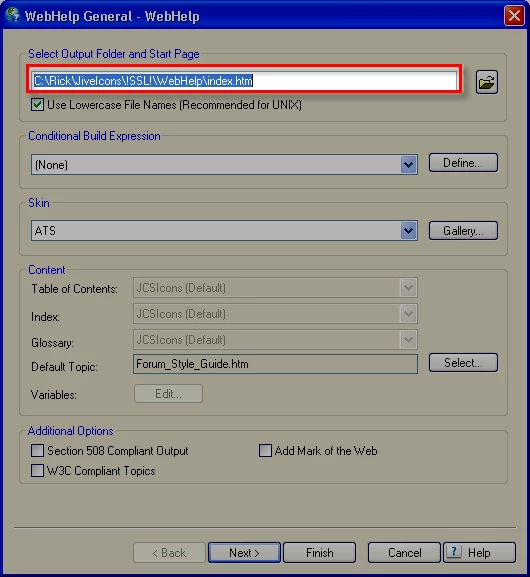
You need to edit the properties of your WebHelp Single Source Layout. Look at the first field:

Click image for larger view:

Cheers... Rick

Helpful and Handy Links

RoboHelp Wish Form/Bug Reporting Form

Begin learning RoboHelp HTML 7 or 8 within the day - $24.95!

Adobe Certified RoboHelp HTML Training

SorcerStone Blog

RoboHelp eBooks

3 replies

MergeThis
Inspiring
August 21, 2009

You're not launching your Start Page, which contains all that neat navigation stuff in a separate frame. The Start Page is selected in the first field of the first page in the Generate wizard.

Good luck,

Leon

Peter Grainge
Community Expert
Community Expert
August 21, 2009

Please use the camera icon next time rather than attaching images, it's easier when looking at the problem.

It looks like you are pointing to the default topic rather than the startpage (defined in the first field of the first page of the wizard).

Good practice is to call it index.htm as developers will be familiar with that, it is a standard for a website. Another one to use is startpage.htm. Anything that avoids the confusion with topic filenames that you have been bitten by.


See www.grainge.org for RoboHelp and Authoring tips

Use the menu (bottom right) to mark the Best Answer or Highlight particularly useful replies. Found the answer elsewhere? Share it here.
GenstoreAuthor
Participating Frequently
August 21, 2009

I created a new topic, then, under 'generate primary layout' I point to that page as the first one.  Is this where the problem is?

RoboWizard
RoboWizardCorrect answer
Inspiring
August 21, 2009

Hi there

You need to edit the properties of your WebHelp Single Source Layout. Look at the first field:

Click image for larger view:

Cheers... Rick

Helpful and Handy Links

RoboHelp Wish Form/Bug Reporting Form

Begin learning RoboHelp HTML 7 or 8 within the day - $24.95!

Adobe Certified RoboHelp HTML Training

SorcerStone Blog

RoboHelp eBooks

RoboWizard
Inspiring
August 21, 2009

Hi there

You are linking to a topic inside the WebHelp and not to the WebHelp Start Page. Look at the first field in the SSL properties. That field will tell you what the WebHelp start page name is.

Cheers... Rick

Helpful and Handy Links

RoboHelp Wish Form/Bug Reporting Form

Begin learning RoboHelp HTML 7 or 8 within the day - $24.95!

Adobe Certified RoboHelp HTML Training

SorcerStone Blog

RoboHelp eBooks

GenstoreAuthor
Participating Frequently
August 21, 2009

Hi Rick...

Sorry to be confused here, but I don't understand your answer......I'm really a novice with RH....can you explain a little deeper?  I want the entire Webhelp topic to display, so the user doesn't have to click on 'Show'