


LDAdams42
Inspiring
April 19, 2018
Question

WebHelp Output Menu Locks Up

  • April 19, 2018
  • 1 reply
  • 437 views

Hello,

I use Robohelp 2017 and Chrome.

Do you know why my WebHelp Output Menu freezes up in Chrome and I keep having to hit the refresh button to get it to work again? It seems to be ok in IE.

Here is a detailed example:

1. I click on "Acro" to view the Acronyms page.

2. I click on the Acronyms page and scroll through the page to read it.

3. When I click on "Basic Satcom Info" on the menu, it won't expand because it's stuck or locked up.

4. I have to hit the refresh button to get the menu to expand.
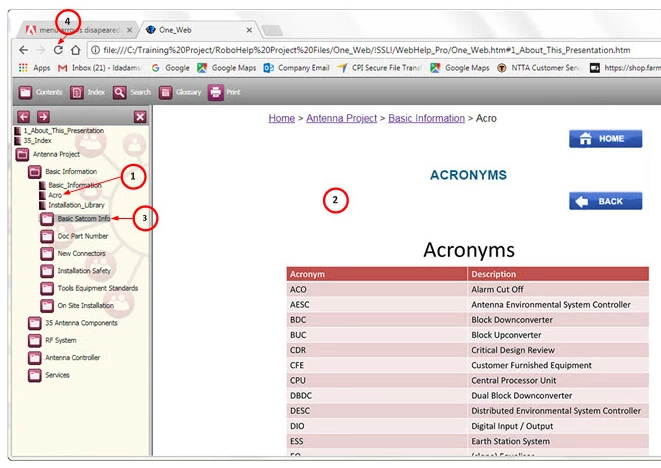
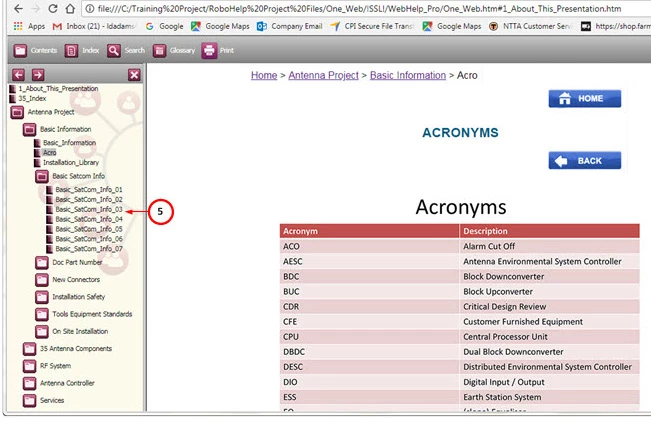
5. Now the menu will expand, until I click in the information pane to read the material. The menu will lock up again and I will have to hit refresh to expand it for the next item.
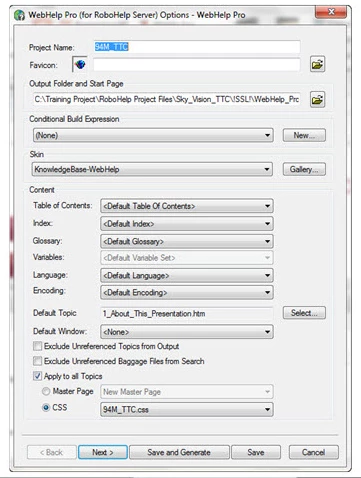
Here is how I generate the presentation.
Any ideas? My customer doesn't like having to refresh all the time.

Thanks

This topic has been closed for replies.

1 reply

Peter Grainge
Community Expert
Community Expert
April 20, 2018

I see you are using a WebHelp Pro output. Does your client have RoboHelp Server installed? It's a common misunderstanding that WebHelp Pro is just a better version of WebHelp. It is not and it relies on having RoboHelp Server installed. That is an additional cost product.

In the absence of RoboHelp Server, you must use WebHelp. Does that resolve the problem?


See www.grainge.org for free RoboHelp and Authoring information.

@petergrainge

Use the menu (bottom right) to mark the Best Answer or Highlight particularly useful replies. Found the answer elsewhere? Share it here.
LDAdams42
LDAdams42Author
Inspiring
April 20, 2018

Peter,

Thank you for your quick response.

My customer does not use RoboHelp Server, so I regenerated the presentation using "WebHelp" and the "stuck menu" problem remains in Chrome. Internet Explorer is fine.

Do you have the same issue with Chrome on your machine?

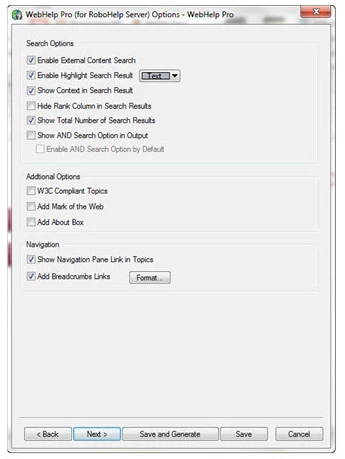
Please see my WebHelp settings screens below:

Jeff_Coatsworth
Community Expert
Community Expert
April 20, 2018

You may be running into browser issues that are addressed on this thread - ToC books not opening in Chrome