
Participating Frequently
October 9, 2013
Question

WebHelp Search Doesn't Display Search Box on Chrome or IE With Chrome Frame

  • October 9, 2013
  • 3 replies
  • 2782 views

I have RH10 (recently upgraded from RH9) and WebHelp projects are having issues displaying the Search box within the Search tab on Chrome as well as IE with Chrome Frame installed. Instead of getting a search box, I get what almost looks like an index of numbers with associated hyperlinks. The search box appears and behaves fine on other browsers such as Firefox, Safari and IE without Chrome Frame. I assume this is JavaScript related since all of my tests point in this direction, but no idea how to get it to behave. Attached is a screen shot of how it appears...Any suggestions?!?
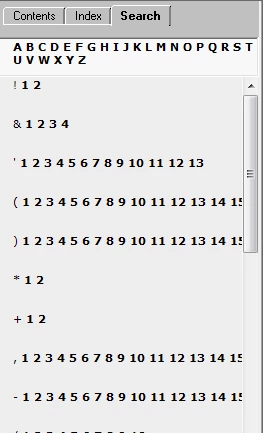
This topic has been closed for replies.

3 replies

KFarrelly
Known Participant
November 5, 2015

I am trying out WebHelp produced in a trial of RoboHelp 2015 and see the same search tab issues as described/shown in the original post of this thread. The help resides on a web server. This happens for me in Chrome on iPad but works ok in Chrome on my Windows laptop. My output settings have the DHTML >HTML selected. The project I'm working with was originally authored in RH9.

I'm wondering if I need to create a new single source layout too to see if that addresses my Chrome on iPad issue?

Table of contents works ok.

Jeff_Coatsworth
Community Expert
Community Expert
November 5, 2015

I would suggest going the Responsive HTML5 route if you want to view it on a tablet.

KFarrelly
Known Participant
November 5, 2015

Thanks. We are considering that. We tested Responsive HTML out with RH11 trial last year and there were delays related to how it refreshed/repainted itself in various browser sizes on laptop (many of our users access our product from laptop). I see improvements in that respect with the Responsive HTML output generated by RH 2015. That is a good thing. I did however see delays when entering search criteria in RH 2015 Responsive HTML output when used on tablet. I've submitted separate discussion on that topic.

Known Participant
May 26, 2015

So...I have been working with Adobe Tech Support all afternoon. The tech support person finally fixed the problem by creating a new single source layout. He did not check my old SSL settings, so I don't know what was set wrong. I did notice that the new SSL has DHTML selected(?) Anyway, I'm thrilled to have this problem solved, and thanks so much for helping me troubleshoot, everyone!

Jeff_Coatsworth
Community Expert
Community Expert
May 27, 2015

Good to hear – but didn’t Rick & I both advise selecting the DHTML to HTML selection before? – could have sworn Rick explained that the browser does a sniffer action to see if DHTML can be used.

Known Participant
May 27, 2015

‌I must have misunderstood! I thought that your point was not to use that setting. I'm sorry!

Jeff_Coatsworth
Community Expert
Community Expert
October 9, 2013

Recent Chrome changes have caused RH10 Webhelp some grief (see this thread - http://forums.adobe.com/message/5745776#5745776). Where is this help located – web server, LAN or local drive? I’ve seen this index of numbers thing before in other threads about Chrome, but I forget what the solution was. Check to see that you’ve got JavaScript turned on.

Participating Frequently
October 9, 2013

The help is located locally. JavaScript is definitely turned on - thanks!