
Question
Webhelp Settings correctly show Output Folder & Start Page, but pubishes a different Start Page.
Why, and where else can I look to fix this?
When I publish a file, it incorrectly opens like this:
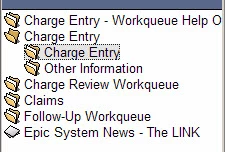
It opens to Charge Entry topic within Charge entry book.
I would like it to open like this:
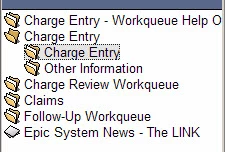
Showing the Workqueue Help Overview page.
The Properties for the WebHelp (Primary Layout has the Output Folder and Start Page as C:\\Charge Entry - Workqueue\!SSL!\WebHelp\charge_entry_-_workqueue_help_overview.htm
That is the correct page to show the file I want to show.
Do you have any suggestion as to where I can go to change it?
Thanks for any help and/or insight you can give.
I'm a relatively new RoboHelp user.
 Vicki
Vicki


 AdChoices