
Aurora Tech Writer
Known Participant
June 13, 2019
Question

WebHelp TOC missing or incomplete

  • June 13, 2019
  • 3 replies
  • 476 views

OK folks, I am having some problems that I can't troubleshoot on my own.

For some reason, all of a sudden, the TOC of my webhelp site is not loading properly, if at all.  Here is a link: FoodPro Help.

I know enough that if hit F12 in chrome, I will see the console and any errors.  However, I don't understand why I am seeing these errors all of a sudden (and what they mean).  Everything was working fine last week.

As an aside, this is what the TOC should look like (aka it loads fine when I run the webhelp site locally from my c:\):
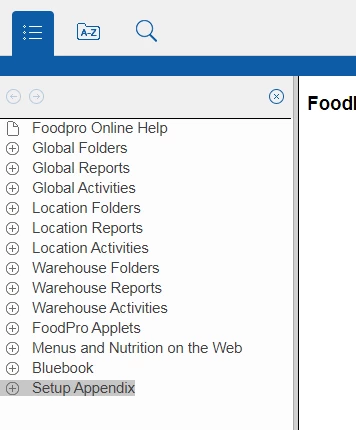
Any insights would be invaluable.  Thanks

Jim

This topic has been closed for replies.

3 replies

Aurora Tech Writer
Known Participant
June 14, 2019

Thanks for the feedback all.  I'll apologize in advance.  I completely forgot that I had scheduled to move our site to a new url yesterday, so it I jumped the gun a bit when a co-worker reported that their was a problem.  Sorry for the inconvenience, but at least the help is working at the new url!

Jim

Peter Grainge
Community Expert
Community Expert
June 14, 2019

No worries. It's late in the week.


See www.grainge.org for free RoboHelp and Authoring information.

@petergrainge

Use the menu (bottom right) to mark the Best Answer or Highlight particularly useful replies. Found the answer elsewhere? Share it here.
Peter Grainge
Community Expert
Community Expert
June 14, 2019
  1. What version of RoboHelp are you using? Please always start a thread with that information as per Sticky Topics.
  2. Is it up to date with patches?
  3. If the answer to those questions is RoboHelp 2017 Update 2, You may need to select the skin again. When RoboHelp 2017 Update 2 was issued, the skins were also updated . However, Adobe could not replace what was in existing outputs as it would have resulted in the loss of customisation. What you need to do is apply the later version of the skin. It is important that you do this by going to the Gallery button in the General settings of your output SSL. Select the layout again from there and give it a new name, you will not be able to save with the same name. There is a page on Adobe's site with layouts but that was never updated so don't use  the layout there.  See if that fixes the problem.


See www.grainge.org for free RoboHelp and Authoring information.

@petergrainge

Use the menu (bottom right) to mark the Best Answer or Highlight particularly useful replies. Found the answer elsewhere? Share it here.
Community Expert
June 14, 2019

I'm not sure what the debug error means, but I would start by checking that whutils.js is actually on your web server. Perhaps it didn't get uploaded correctly.