

Weirdness in WebHelp Styles
So, I just upgraded a few projects to RH 9. I'm noticing when I output to a WebHelp layout in RH 9, my styles differ from what's in the WYSIWYG editor as well as other layouts.
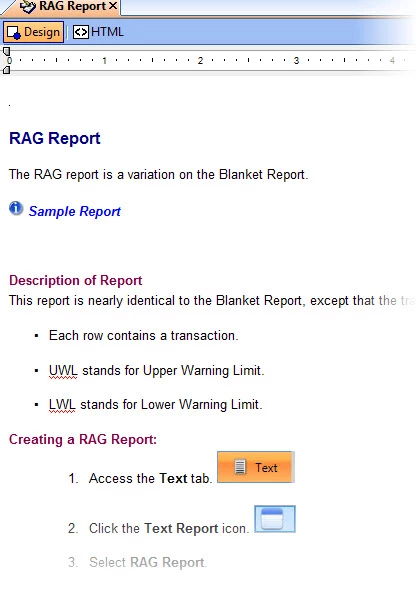
For example, here's a topic in the WYSIWYG editor (apologies for the "large-ish" images--but I wanted to more easily display text size differences):
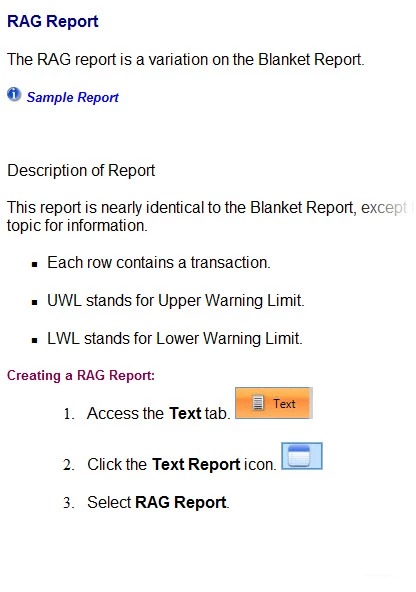
And here's the same topic inside the WebHelp browser (IE):
And just for kicks--as well as for comparison since I know HtmlHelp outputs use IE to display their content--here's the same topic inside a CHM output:
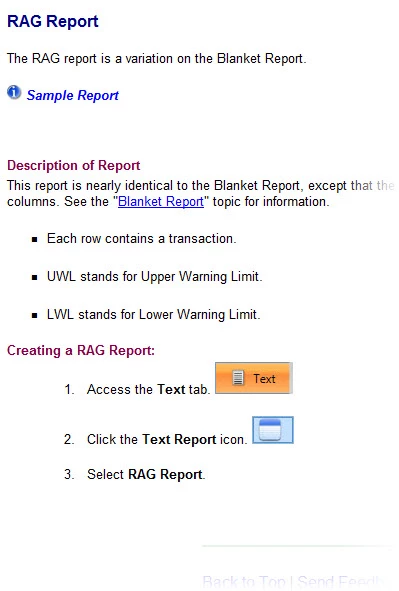
Notice that the CHM is correctly displaying while the WebHelp is not. In the WebHelp, the font size is slightly larger, and one of my headings isn't getting the reddish style.
I've verified that the CSS file referenced is in the proper location on the server and contains the necessary styles.
I've also checked the HTML view of the topic inside RH to see if there was any in-line formatting that might be messing this up, and the code looks good to me:
...
<h4 class="BodyText">RAG Report</h4>
<p class="BodyText">The RAG report is a variation on the Blanket Report.</p>
<p class="Heading4B"><a class="dropspot" href="javascript:TextPopup(this)"
id="a2"><img src="i_blue_sm.jpg" alt="" style="border: none;"
width="15" height="15" border="0" />
Sample Report</a></p>
<div class="droptext" id="POPUP465494784" style="display: none;">
<p style="font-style: italic; font-weight: bold;"><img src="example_rag_report.jpg"
alt="" style="border: none;"
width="833"
height="608"
border="0" /></p>
</div>
<p class="heading4b"> </p>
<p class="heading4b">Description of Report</p>
<p class="BodyText">This report is nearly identical to the Blanket Report,
except that the transactions are shown as rows instead of columns. See
the "<a href="Blanket_Report.htm">Blanket Report</a>" topic
for information.</p>
<ul type="square">
<li class="p-BodyText"><p class="BodyText">Each row contains a transaction.</p></li>
<li class="p-BodyText"><p class="BodyText">UWL stands for Upper Warning
Limit.</p></li>
<li class="p-BodyText"><p class="BodyText">LWL stands for Lower Warning
Limit.</p></li>
</ul>
<p class="Heading4B">Creating a RAG Report:</p>
<ol type="1">
...
This seems to be a RH 9 bug, since that's the main thing that's changed with this project. Has anyone else seen this and do you know of any workarounds to get WebHelp to display properly?


 AdChoices