
Legend
October 6, 2014
Question

What exactly do the "levels" in Browse Sequence Editor mean?

  • October 6, 2014
  • 1 reply
  • 408 views

Hi

I have a ToC with three levels Unit > Lesson > Topic > Sub Topic. This ToC is coming from the linked FM. The ToC is paginated at Topic level and Sub Topic is basically a section within the Topic.

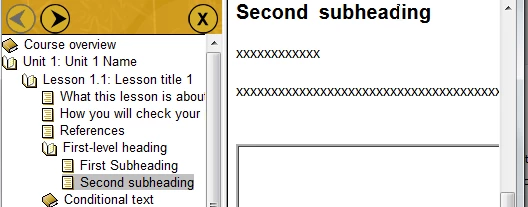
Now, I wanted my users to navigate through the course at sub topic level using Browse Sequence buttons. For example, in the screenshot shared below, I want the users to move from First Sub Heading sub topic to Second Sub Heading topic using Browse Sequence buttons. I thought I could achieve this by increasing the browse sequence levels. But that is not working. So, I am curious. What do these mean? Can I actually achieve my goal at all? If browse sequence level is not the correct way, can somebody please help me with the right approach?
Thanks

    This topic has been closed for replies.

    1 reply

    Captiv8r
    Legend
    October 6, 2014

    Hi there

    So, with the Browse Sequence Editor, you are able to create multiple sequences. For example, perhaps you have multiple "paths" you can take Logically move from one topic to the next. In that case, multiple sequences would be helpful.

    The option to use the "Levels" in the TOC will create a new Sequence for all topics in that level.

    Cheers... Rick

    Legend
    October 6, 2014

    Thanks Rick. That is how I thought it would work and on that understanding, I specified "4" levels so that my learner can use the button to move from First Subheading to Second Subheading. But that is not working.

    4 levels as per my screenshot/ understanding: Unit > Lesson > First-level heading > First Subheading.

    Any idea why?

    Sreekanth

    Captiv8r
    Legend
    October 6, 2014

    Hello again

    Unless I'm misunderstanding, it sounds like you one one single sequence that would move from top to bottom of the TOC. I call these "page turners". To accomplish that goal, enter 0 for the levels and you should be set.

    Cheers... Rick