


Sleant
Inspiring
March 17, 2022
Question

What Exactly is "Include Index" Checkbox for in Responsive HTML5

  • March 17, 2022
  • 2 replies
  • 351 views

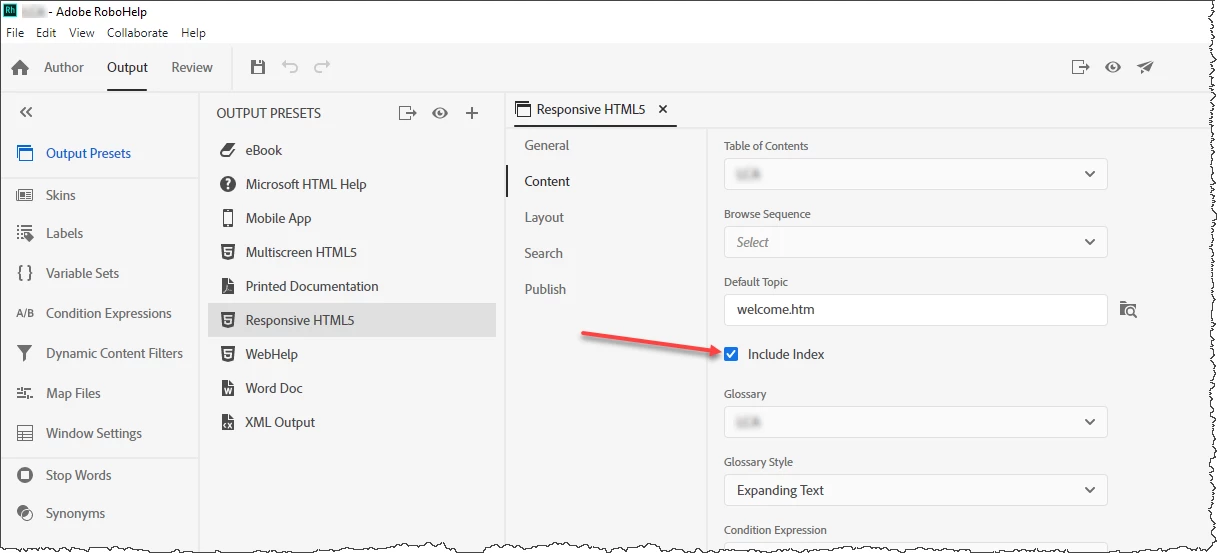
Using RH 2020, have always wonder what the "Include Index" checkbox is for when publishing as Responsive HTML5. What happens when it's checked? What happens when it's not checked? We have always had it checked in our output. Thank you all so much.
    This topic has been closed for replies.

    2 replies

    Community Expert
    March 17, 2022

    Also note that if you haven't added any index keywords to your topics the index will be empty even when the setting is turned on. 🙂


    And deselecting the option in the output preset will not hide the tab/button. To do that, there's a setting in the skin.


    Peter Grainge
    Community Expert
    Community Expert
    March 17, 2022

    If it's checked your index gets included in the output, otherwise it is not.

    ________________________________________________________

    My site www.grainge.org includes many free Authoring and RoboHelp resources that may be of help.


    Use the menu (bottom right) to mark the Best Answer or Highlight particularly useful replies. Found the answer elsewhere? Share it here.
    Sleant
    SleantAuthor
    Inspiring
    March 17, 2022

    Oh. Then am I duplicating effort if I always have the "Start Page" field as index.htm? Could I have left the Start Page field blank if I have the Include Index checkboxe checked?

    Peter Grainge
    Community Expert
    Community Expert
    March 17, 2022

    No. The start page index.htm is a standard name for opening a website and a help output is effectively a web site. Look at the RoboHelp Tour on my site. It has nothing whatsoever to do with the index in your project.

    ________________________________________________________
    My site www.grainge.org includes many free Authoring and RoboHelp resources that may be of help.


    Use the menu (bottom right) to mark the Best Answer or Highlight particularly useful replies. Found the answer elsewhere? Share it here.