


Inspiring
April 14, 2015
Answered

What I see in the CSS is not what displays in the HTML -- why?

  • April 14, 2015
  • 2 replies
  • 1924 views

I am working with TCS 5, RH 11, and FM12, all patched up. I am finding that imported FM works better than linked (slightly fewer crashes and access to CSS seems better).

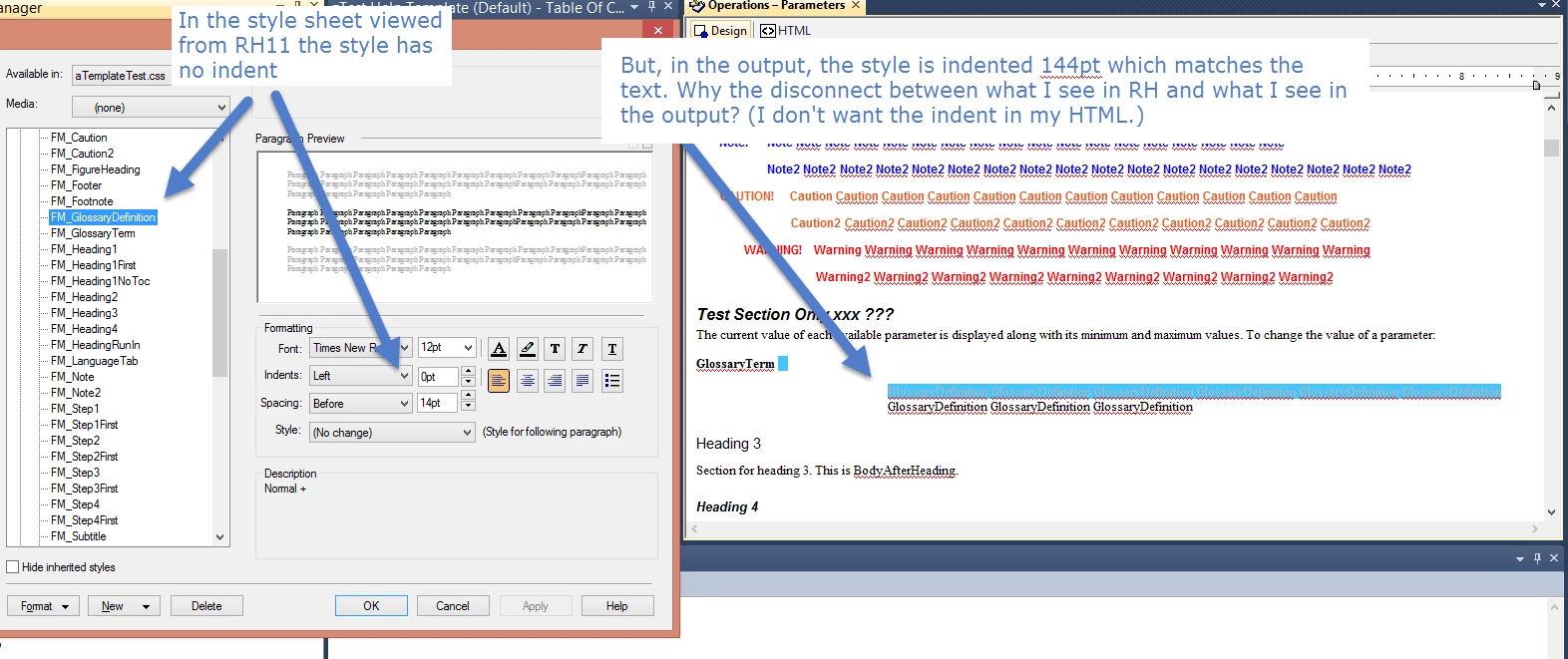
However, in several cases, the RH CSS is not showing what the HTML is displaying. Why?

For example, my GlossaryDefinition style (FM_GlossaryDefinition) is indented in FM (it is part of a run-in head construction) and I don't want this in the output HTML. But, the CSS as displayed in RH shows no indent while the HTML displays an indent. How can this be? what is going on?
Thanks,

Sean

This topic has been closed for replies.
Correct answer Jeff_Coatsworth

Hmm, just tested with a copy of an upgraded RH10 FM to RH project – I’m getting the extra css in with the output HTML too & I’m seeing 2 lines of reference to the “unwanted” css and to my desired “apply3all.css” – I think there’s a bug in here. My bullets are all messed up, but if I delete the line referencing the CSS I file in the folder, it behaves correctly.


@seanb_us - I've filed a bug report now on this behaviour; you should probably do one too. Your experimental project will probably be ideal for them to use if they need one to see what's going on.

PS - the SSL recipe is the choices you make in the Single Source Layouts pod (those are your help outputs). The term "recipe" is cribbed from the great @Captiv8r (Rick Stone) ;>)

2 replies

Peter Grainge
Community Expert
Community Expert
April 14, 2015

Take a look at Importing Word on my site. I think most of the logic is the

same. I suspect you are not linked to your normal CSS or some inline

styling is overriding the CSS.

Use the menu (bottom right) to mark the Best Answer or Highlight particularly useful replies. Found the answer elsewhere? Share it here.
Seanb_usAuthor
Inspiring
April 14, 2015

Would you provide a link when you have a chance? Thanks!

Jeff_Coatsworth
Community Expert
Community Expert
April 14, 2015

Peter's site is grainge.org - look at your \!SSL!\WebHelp (or whatever flavour of help you are making) to see the resulting HTML pages

Jeff_Coatsworth
Community Expert
Community Expert
April 14, 2015

The image on the right isn't your output - it looks like it's the RH topic - what you see in the topic isn't what you necessarily get when you generate your output. I would generate and have a look at that.

Seanb_usAuthor
Inspiring
April 14, 2015

Oh. So, from within RH, am looking at the Project Manager, where do I find my output? I was looking under Project Files.

Sean