Participant
July 18, 2014
Answered

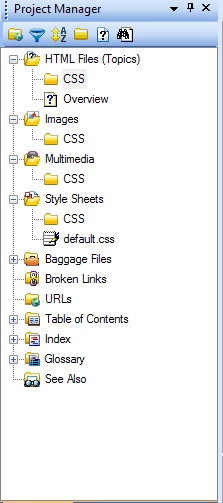
When creating a folder in Robo help duplicates are created in each structure

  • July 18, 2014
  • 1 reply
  • 340 views

When trying to create a CSS folder in style sheets it duplicates this folder in HTML Files, Images, and Multimedia how does one disable this from creating duplicates?

This topic has been closed for replies.
Correct answer Captiv8r

Hi there

That's perfectly expected behavior.

Note that each of these "structures" is really just a "filter" presenting files of that specific type. The folder is really only there once on your operating system. You can easily confirm that by right-clicking any of these and choosing Explore from the context menu. Actually, if you did that you would also notice that there will be no actual folder named Style Sheets, or Multimedia or Images.

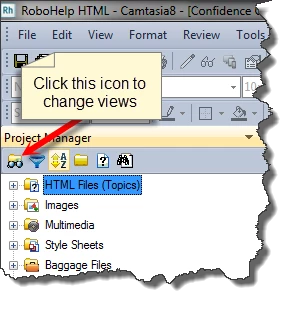
If you find it just too distracting to view things this way, perhaps you should consider switching from Classic View to Global View.
Cheers... Rick

1 reply

Jeff_Coatsworth
Community Expert
Community Expert
July 18, 2014

Why do you need to create a folder?

Grinch42Author
Participant
July 18, 2014

I was instructed by the technical writers to breakdown a structure for the CSS and scripts used for the website. And any time I try to add any type of folder it gets duplicated I tested on another version  the technical writer uses and it does not occur on theirs.

Captiv8r
Captiv8rCorrect answer
Legend
July 18, 2014

Hi there

That's perfectly expected behavior.

Note that each of these "structures" is really just a "filter" presenting files of that specific type. The folder is really only there once on your operating system. You can easily confirm that by right-clicking any of these and choosing Explore from the context menu. Actually, if you did that you would also notice that there will be no actual folder named Style Sheets, or Multimedia or Images.

If you find it just too distracting to view things this way, perhaps you should consider switching from Classic View to Global View.

Cheers... Rick