deniseh47762385
Known Participant
January 20, 2023
Answered

Where are the pre-formatted tables? How to customize Table formatting.

  • January 20, 2023
  • 7 replies
  • 1229 views

Tables - Adobe RoboHelp comes with a number of pre-formatted tables that can be edited to suit your own requirements or you can create your own from scratch.

I'm using RoboHelp 2022 and I don't see any pre-formatted tables. If I Insert Table from the toolbar, I just get to select the number of rows/columns and a simple plain table is inserted.

If I select a table and right-click, I don't see Table Properties. I do see Content Properties.


I created a custom Table Style but I'm having trouble with the look. I already add a TableHeader style.

We are also going to import Markdown files - some have tables - so I want the <table> to have the custom table style. I noticed the .htm topics from imported .md files have a <thead> and my old tables have just <tbody> and rows the color/padding in the rows that are the heading.


I don't want to edit all my old tables either. Suggestions?
 

    This topic has been closed for replies.
    Correct answer Amebr

    Here's what I did.


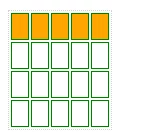
    1. Set up a table with green borders, orange background on the first row.

    2. Insert a table in the topic.

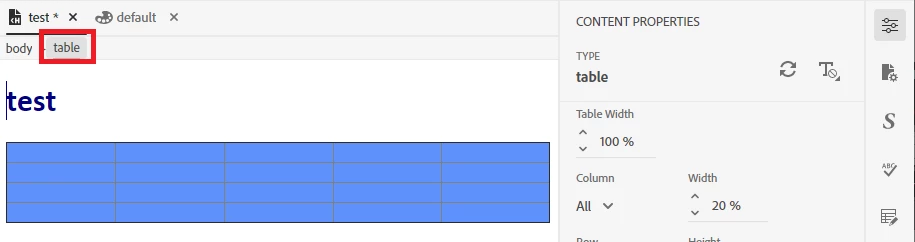
    3. Click inside the table and select the table using the tag breadcrumbs.

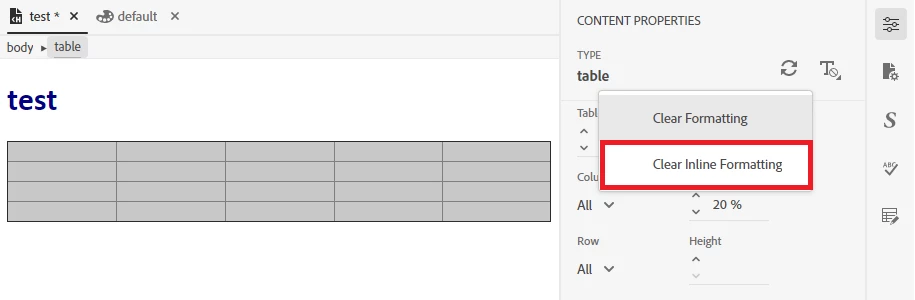
    4. Click the Clear Formatting button and select 'Clear Inline Formatting'.

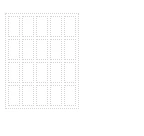
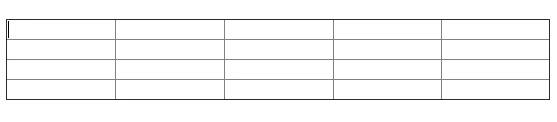
    5. Now the table looks like this

    6. Apply my ugly table.


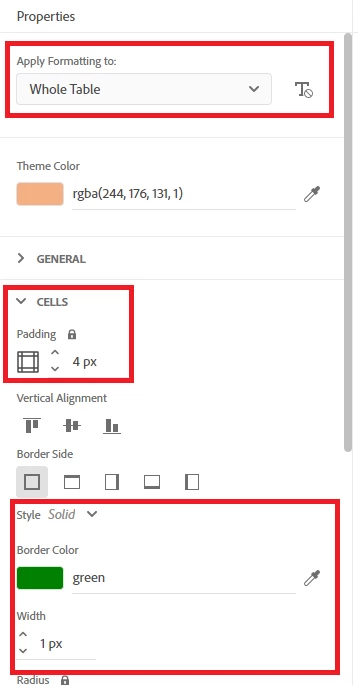
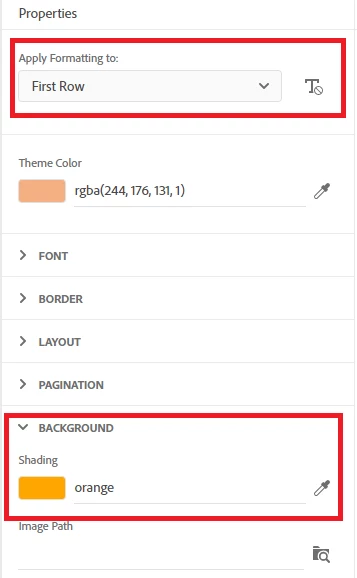
    Here are the settings I made for my table:


    Hopefully that helps.

    7 replies

    Community Expert
    January 30, 2023

    The cell spacing is under the General section when you have Whole Table in Apply formatting to selected.


    For the space below the table, try setting padding-bottom or margin-bottom. Click the padlock so you can set it separately.


    I'm not sure what you mean for the last paragraph. I'm not sure where a separate style comes in to it. You should be able to set all the settings in the table style.

    deniseh47762385
    Known Participant
    January 31, 2023

    Ok, thanks. The bottom margin worked great. 

    Thanks for all your help! You can close this out now.

    AmebrCommunity ExpertCorrect answer
    Community Expert
    January 29, 2023

    Here's what I did.


    1. Set up a table with green borders, orange background on the first row.

    2. Insert a table in the topic.

    3. Click inside the table and select the table using the tag breadcrumbs.

    4. Click the Clear Formatting button and select 'Clear Inline Formatting'.

    5. Now the table looks like this

    6. Apply my ugly table.


    Here are the settings I made for my table:


    Hopefully that helps.

    deniseh47762385
    Known Participant
    January 30, 2023

    Thank you so much! I guess the breadcrumb | table selection works differently than me just selecting the table and clearing the format since the formats weren't the same.


    I've got my table 99% the way I want it; would prefer just a little more cell border spacing (space between the individual cells) but not padding inside the cell, and can't figure that out. If I do Border spacing that's just on the outside table border.


    Also, how can I add some line spacing right after the table so the next text/Subheading is not right under the table?


    FYI: Since the <thead> is not supported right now for table Styles (imported .md files have 1st row in <thead>), my workaround is to change the <th> in the <thead> <tr> <th> rows to <td>, cut/paste the <tr> <td> rows into the <tbody> section, then remove the <thead> section before I add the custom Style or else the 1st row is applied to the 2nd row.

    Community Expert
    January 26, 2023

    You may need to click Clear Formatting a couple of times. The first time was probably only clearing the td formatting for the current table cell. You should be able to see what tag is selected at the top of the General panel. Use the tag breadcrumbs at the top of the topic to select the table tag, then click Clear Formatting and that should remove all inline formatting from the table.


    For the table border, I think you've set the outside border of the table (darker grey). However, because of the way CSS works, you also need to set cell borders.  (The RH interface will show table lines even if you haven't set a border style, so I think that's why you can see light grey cell "borders" in the editor - they are fake borders, not real ones.  I could be wrong though as I'm just going off what I can see in the screenshots.)


    The following instructions are for an earlier version of RH, but the principles should be the same, even if some of the interface is a little different.


    In Apply formatting to, select 'Whole Table'. Then expand the CELLS section and set the border to the same as you set in the BORDER section.


    To set styling for a header row, you don't need to use a separate style. Instead, in Apply formatting to, select 'First Row'. Then set the background colour, font size and colour etc to the desired values.


    Does that help?

    deniseh47762385
    Known Participant
    January 27, 2023

    I removed the formatting and reapplied it and no change.

    I do have Table and Cell Border Color of #c0c0c0, Cell Padding 6x, and General Border Collapse of 'separate' but the cells do not "separate" like the Preview.


    If I look at the table in html/source, I see this:

    <table border="1" cellpadding="1" cellspacing="1" class="TableTernion" style="border-collapse:collapse; width:100%">

    If I change the border-collapse:collapse to border-collapse:separate, I do now see the cell "padding" in the table.

    No matter if I select the Style General Border Collapse is 'separate' or 'collapse', it shows the same border-collapse:collapse (unless I change it in html).

    This looks like a bug.

    I just want to create a table as needed (or have a basic one created from an imported .md file), then apply the TableTernion Style to the table without changing the html code.

    deniseh47762385
    Known Participant
    January 27, 2023

    I also have the change the cellpadding in html to cellpadding="4" cellspacing="4" manually since it doesn't use the 


    Peter Grainge
    Community Expert
    Community Expert
    January 24, 2023

    Your other option is to create the table you want in the CSS editor. It will not appear in Templates pane but you can apply it from the CSS. How is described in the page I pointed you to.

    ________________________________________________________

    My site www.grainge.org includes many free Authoring and RoboHelp resources that may be of help.


    Use the menu (bottom right) to mark the Best Answer or Highlight particularly useful replies. Found the answer elsewhere? Share it here.
    deniseh47762385
    Known Participant
    January 25, 2023

    I've been trying to customize a very simple table layout with little success. The custom TableTernion Style settings are not reflected on my topic table. I Insert Table into a test topic, selected table, select Table Properties, Clear both formatting, selected S and my new Style, and it doesn't look like I expected.

    The html shows:

    <table border="1" cellpadding="1" cellspacing="1" class="TableTernion" style="border-collapse:collapse; width:100%">

    but I set the border to separate, padded to 4px...

    Here's the TableTernion Style Preview:

    Here's the table in my topic:


    I also want to add the first row with a different font color/weight and background. I already had a TableHeader style from long ago (that's in my current topics) but when applied to first row of this new table, it looks wrong; I want the background to consume the whole cell:

    I keep going around in circles so can you help?

    Community Expert
    January 23, 2023

    Is your question "how can I change what appears in that list"? If so, I think the answer is you can't. 


    However, once you've applied one of those styles to a table it should appear in your stylesheet and you can customise it there, or duplicate it if you want to create your own style name.

    Peter Grainge
    Community Expert
    Community Expert
    January 21, 2023

    Insert a table using the top toolbar. Click the Table breadcrumb and you will then see the templates.

    ________________________________________________________

    My site www.grainge.org includes many free Authoring and RoboHelp resources that may be of help.


    Use the menu (bottom right) to mark the Best Answer or Highlight particularly useful replies. Found the answer elsewhere? Share it here.
    deniseh47762385
    Known Participant
    January 23, 2023

    The only thing I see when I select Insert Table is this:

    No other dropdown or window.

    deniseh47762385
    Known Participant
    January 23, 2023

    OK, I "found" Table Properties in the right pane after I selected the table (not a right-click like in the old days). These are the only templates I see.


    Peter Grainge
    Community Expert
    Community Expert
    January 20, 2023

    Start here. RH2022 Tables (grainge.org)


    <TH> is not currently supported but is expected in an upcoming update.

    ________________________________________________________

    My site www.grainge.org includes many free Authoring and RoboHelp resources that may be of help.


    Use the menu (bottom right) to mark the Best Answer or Highlight particularly useful replies. Found the answer elsewhere? Share it here.
    deniseh47762385
    Known Participant
    January 20, 2023

    Ok, so there are no current pre-formatted tables like this article states? 

    https://www.grainge.org/pages/authoring/rh_tour/rh2022/authoring/tables.htm

    Jeff_Coatsworth
    Community Expert
    Community Expert
    January 20, 2023

    It's late night for Peter, but the answer is no, there are, but that tablehead element you talk about isn't supported yet.