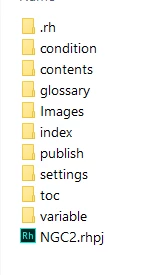
Your topics, files, images etc, whatever you want in your output, needs to go under 'contents'. But within that folder it can go anywhere that suits your organisational needs.
If you upgraded an existing project, if you're using 2020 Update 1, all those files should be in the same place they lived in RH2017, although that may "look" different depending on what view you were using in the Project Manager pod. If you used "Project Files" view, things should look pretty similar to the "Project Files" folder. If you used "HTML Files (Topics)" view, then things will look different. (If you upgraded to the intial release of 2020, then all your images, javascript, etc will have been moved into the assets folder.) Post back if you have more questions about this or are confused.
Additionally, "Baggage files" doesn't exist. If you want a file in your output, say Word templates or something, you need to either link from a topic, or include the file in the TOC. You can set it to hidden there, so it will be in the output but not display in the TOC.
Do read through Peter Grainge's Robohelp Tour for RH2020 really good information about the changes: https://www.grainge.org




 AdChoices