techdev411
Participant
October 28, 2015
Answered

Where is the option to convert WebHelp to CHM Output In New 2015 Release?

  • October 28, 2015
  • 2 replies
  • 774 views

Hello.

I used to use RoboHelp 11 and in that version to get a CHM file with skins all I had to do with a WebHelp project was select File->Generate->WebHelp to CHM Converter and the CHM file would be output.  But that menu option is gone in the 2015 version. How do I do it now so get the skins from the WebHelp project? Thanks in advance.

Robert G. Marquez
http://robertmarquez.com

This topic has been closed for replies.
Correct answer techdev411

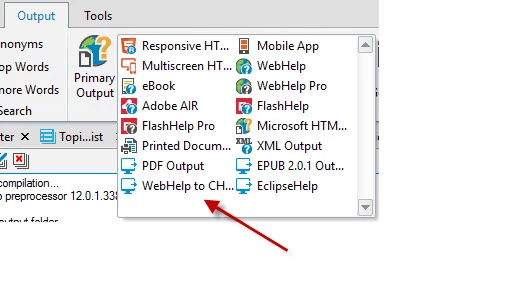
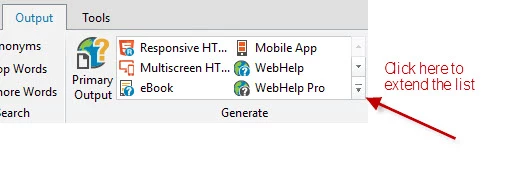
Ok after some additional investigation I found out where the CHM output is. In Adobe RoboHelp 2015 there is an Output tab and in that tab is a generate section. In that section it lists many options but only 3 rows show at a time.  I had to click the scroll bar which rolled out a longer list which showed the CHM outout.  You have to hold you mouse over the option to let it show the full title.

Robert G. Marquez

http://robertmarquez.com

2 replies

techdev411
Participant
October 28, 2015

Thanks Rick for the other options.

Robert

techdev411
techdev411AuthorCorrect answer
Participant
October 28, 2015

Ok after some additional investigation I found out where the CHM output is. In Adobe RoboHelp 2015 there is an Output tab and in that tab is a generate section. In that section it lists many options but only 3 rows show at a time.  I had to click the scroll bar which rolled out a longer list which showed the CHM outout.  You have to hold you mouse over the option to let it show the full title.

Robert G. Marquez

http://robertmarquez.com

Captiv8r
Legend
October 28, 2015

Hi there

There is another couple of ways to accomplish this.

Use the Scripts button in the Tools ribbon.

Add the Scripts button to the Quick Access Toolbar (QAT)

Cheers... Rick