Participant
March 18, 2024
Answered

Why are settings missing from my PDF output options?

  • March 18, 2024
  • 1 reply
  • 228 views


Hey, all! I'm a science-writer-turned-technical-writer. I'm a brand new RoboHelp user, training with some Adobe tutorials.


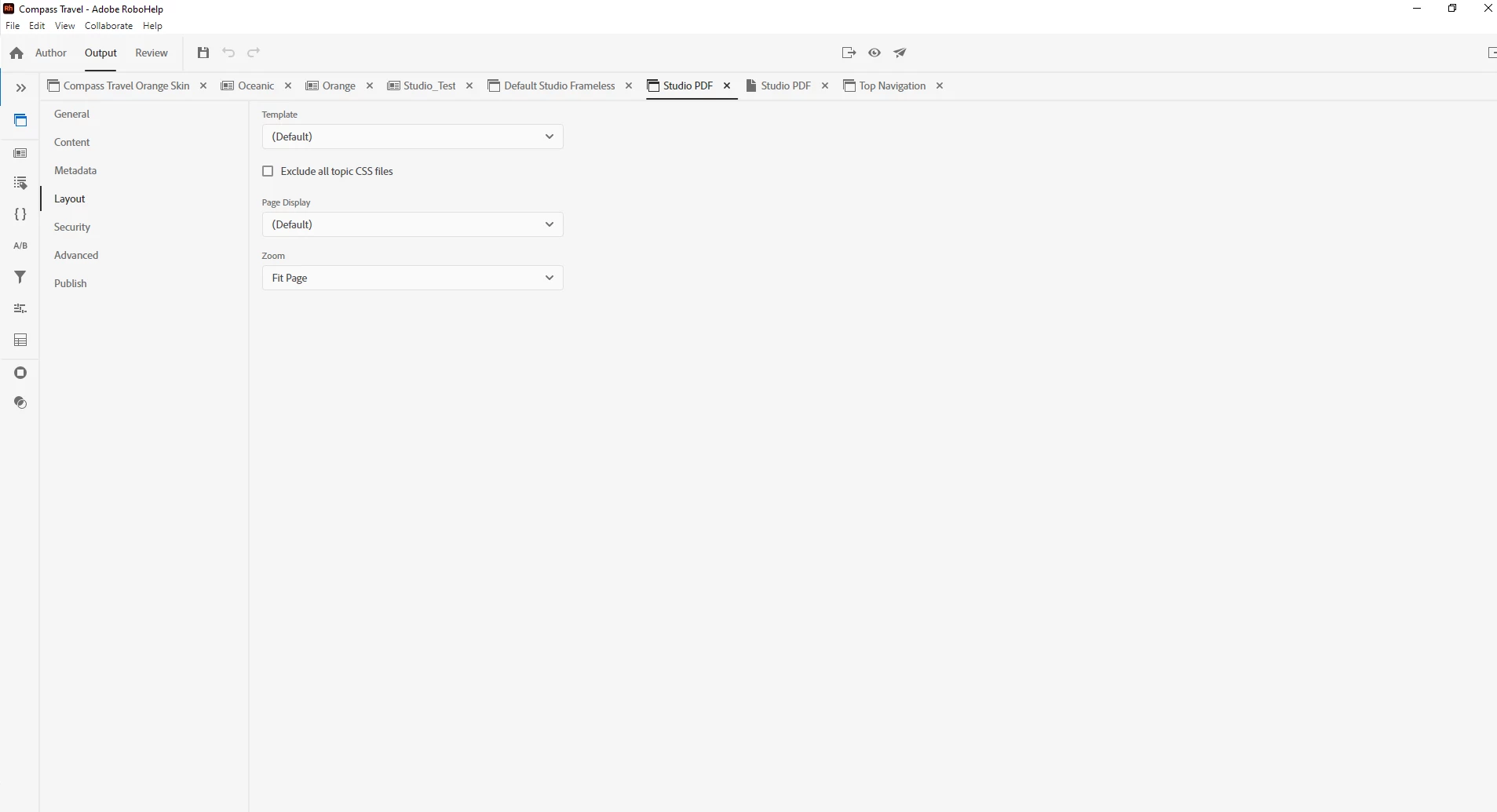
I'm a little concerned--several tutorials now have shown options I don't have when exporting a PDF. I'm missing settings from the Layout section, and there is just no Master Pages option. Has anyone else encountered this? Is there an easy fix?


This topic has been closed for replies.
Correct answer Peter Grainge

You haven't said which version of RoboHelp you are using. Please always start a thread with this information.

Please go to Help > About and include the full version number. I'm guessing you are on 2022 from the image, hopefully with Update 3 applied. That will show as 2022.3.


I suspect your tutorials were for earlier versions. In 2022 Master Pages became became Topic Layouts. They do the same thing and are described for 2022 at RH2022 Topic Layouts (grainge.org)


In the PDF output Templates are now applied rather than Master Pages. Take a look at RH2022 PDF Templates (grainge.org)


Hope that helps.

________________________________________________________

My site www.grainge.org includes many free Authoring and RoboHelp resources that may be of help.


1 reply

Peter Grainge
Community Expert
Peter GraingeCommunity ExpertCorrect answer
Community Expert
March 18, 2024

You haven't said which version of RoboHelp you are using. Please always start a thread with this information.

Please go to Help > About and include the full version number. I'm guessing you are on 2022 from the image, hopefully with Update 3 applied. That will show as 2022.3.


I suspect your tutorials were for earlier versions. In 2022 Master Pages became became Topic Layouts. They do the same thing and are described for 2022 at RH2022 Topic Layouts (grainge.org)


In the PDF output Templates are now applied rather than Master Pages. Take a look at RH2022 PDF Templates (grainge.org)


Hope that helps.

________________________________________________________

My site www.grainge.org includes many free Authoring and RoboHelp resources that may be of help.


Use menu (bottom right) to mark as Best Answer or to Highlight particularly useful replies. Found the answer elsewhere? Share it here.

Cherry77Author
Participant
March 18, 2024

Thank you! Sorry for leaving my version info out, I'll lead with that in the future. It looks like Version 2022.3.93, yes. And the pages you linked are exactly what I was looking for. Thanks again!