

Why do changes in RH not get into my final output?
RH 9.02.271
On Windows 7 64-bit
On Windows Vista 32-bit Virtual Machine
Hi RoboHelpers,
I've been using RH 9 for many years now, and have a problem I can't explain.
We got our main project back from our translators and I started building and testing our chm output.
On one topic, we have this portion of correct RH content:
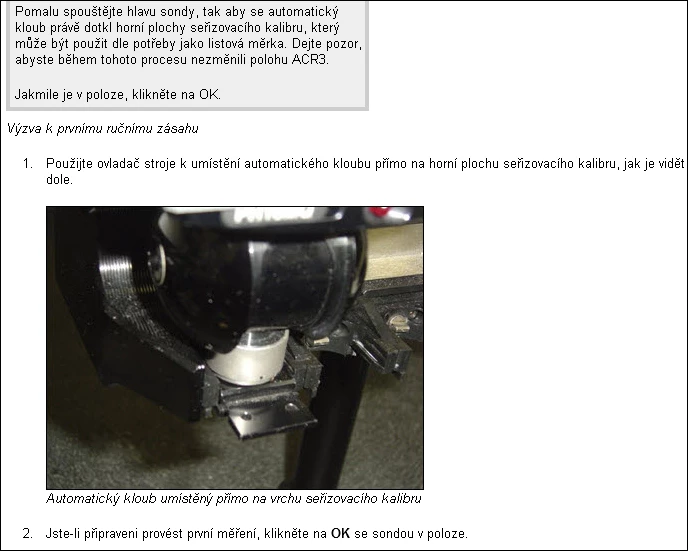
However, in the chm output, it looks like this:
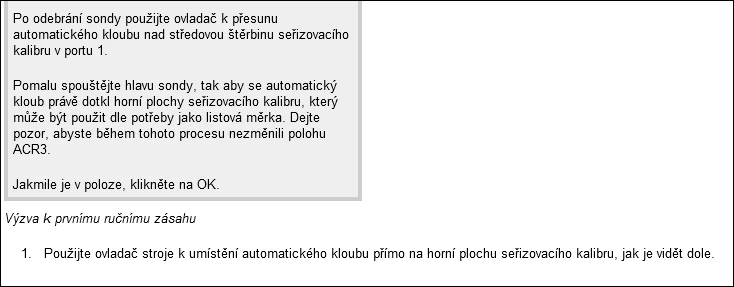
Notice that the image, caption, and step 2 are missing. It simply ends after the first item. All text to the end of the topic, including the footer is missing.
The HTML for the topic, insofar as I can tell, is fine:
<?xml version="1.0" encoding="utf-8" ?>
<!DOCTYPE html PUBLIC "-//W3C//DTD XHTML 1.0 Transitional//EN" "http://www.w3.org/TR/xhtml1/DTD/xhtml1-transitional.dtd">
<html xmlns="http://www.w3.org/1999/xhtml">
<head>
<meta http-equiv="Content-Type" content="text/html; charset=utf-8" />
<meta name="topic-check-list" content="First Draft,Added To TOC,Links,Index keywords,Images,Tested" />
<meta name="topic-status" content="Complete" />
<meta name="template" content="Standard.htt" />
<meta name="build tags" content="Pcdmis" />
<meta name="generator" content="Adobe RoboHelp 9" />
<title>ACR3: Krok 5 - Proveďte první ruční zásah</title>
<link rel="StyleSheet" href="../Pcdmis40.css" type="text/css" />
</head>
<body>
<h4>Krok 5 - Proveďte první ruční zásah</h4>
<p class="BodyText">Při zahájení procesu kalibrace vás řada oken se zprávami
povede procesem měření, kdy se zaznamenají dvě polohy a změří dva ruční
zásahy. K úplné definici orientace tohoto zásobníku v rovině XY stroje
jsou nutné tři zásahy.</p>
<p class="BodyText">Stojan MUSÍ BÝT vyrovnaný paralelně s osou X nebo Y.
Ruční zásahy lokalizují zásobník v prostoru stroje. Postupujte podle této
nápovědy a proveďte potřebné zásahy, jak ukazují obrázky pro každý zásah.</p>
<p class="BodyText">Renishaw poskytuje seřizovací kalibr se zásobníkem.
Proveďte první ruční zásah na horní ploše seřizovacícho měřidla vloženého
v portu 1. Použijte seřizovací měřidlo k provedení zásahů u portu 1 bez
nutnosti použít tělo sondy.</p>
<p class="Figure"><img src="ACR3_files/Setting_gauge_ACR3.jpg" alt="" border="0" /></p>
<p class="Caption">Seřizovací kalibr</p>
<p class="BodyText">Výzva k prvnímu ručnímu zásahu na horní část plochy:</p>
<div class="MsgBox">
<div class="MsgBoxTitle">
Zpráva PC-DMIS
</div>
<p>Odjistěte rychlospojku kloubu a odeberte sestavu sondy.</p>
<p>Po odebrání sondy použijte ovladač k přesunu <?rh-ignored text="autojoint" ?>automatického
kloubu nad středovou štěrbinu seřizovacího kalibru v portu 1.</p>
<p>Pomalu spouštějte hlavu sondy, tak aby se <?rh-ignored text="autojoint" ?>automatický
kloub právě dotkl horní plochy seřizovacího kalibru, který může být
použit dle potřeby jako listová měrka. Dejte pozor, abyste během tohoto
procesu nezměnili polohu ACR3.</p>
<p>Jakmile je v poloze, klikněte na OK.</p>
</div>
<p class="Caption">Výzva k prvnímu ručnímu zásahu</p>
<ol type="1">
<li><p class="BodyText">Použijte ovladač stroje k umístění automatického
kloubu přímo na horní plochu seřizovacího kalibru, jak je vidět dole.</p></li>
</ol>
<p class="Figure" style="margin-left: 40px;"><img src="ACR3_files/First_manual_hit_ACR3.jpg"
alt="" style="border: none;"
border="0" /></p>
<p class="Caption" style="margin-left: 40px;">Automatický kloub umístěný
přímo na vrchu seřizovacího kalibru</p>
<ol start="2" type="1">
<li><p class="BodyText">Jste-li připraveni provést první měření, klikněte
na <span class="bold">OK</span> se sondou v poloze.</p></li>
</ol>
<p class="BodyText">V<a href="ACR3_Step_6_Take_Second_Manual_Hit.htm" title="Krok 6 - Proveďte druhý ruční zásah">
dalším kroku</a>, provedete druhý ruční zásah.</p>
<?rh-placeholder type="footer" ?>
</body>
</html>
Does anyone have any ideas why my content in the chm simply stops in the output?
In addition, something else seems to be going on. For example, as a test, I tried making a change to this topic and to some other topics and regenerated the help, but the changes never ended up in the test chm output. It's like the content is stuck during generation at some point in time and isn't refreshing, getting the latest. The RH source looks fine, but not the output. I've tried restarting my comp and regenerating and I get the same thing. What's strange though is that I created another test chm output with just the one above topic and excluding all others, and it shows the entire topic with the changes just fine.
Thanks in advance for any help or ideas.


 AdChoices