
Participating Frequently
December 16, 2015
Answered

Why do topics in my RoboHelp project disappear after upgrading to RoboHelp 2015?

  • December 16, 2015
  • 4 replies
  • 3033 views

After upgrading a project from RoboHelp 10 to RoboHelp 2015, all topics in the project are deleted when the topics are subsequently updated. The project is a linked FrameMaker document - the project upgrades as expected, but when I update the topics, one of two things happens:

  1. Links are broken and all topics appear in the "Broken Links" folder or,
  2. All topics simply disappear.

(Running Adobe Tech Comm Suite 2015  on Windows 7, 64-bit; RoboHelp updated to v12.0.2.384; FrameMaker updated to v 13.0.2.433.)

I did have some success updating topics if I update each 'chapter' in the book singly, but if I use the "Update All" option, the results are as stated above. And, as you can see, the results are not consistent. This has happened with both projects that I have converted to RoboHelp 2015.

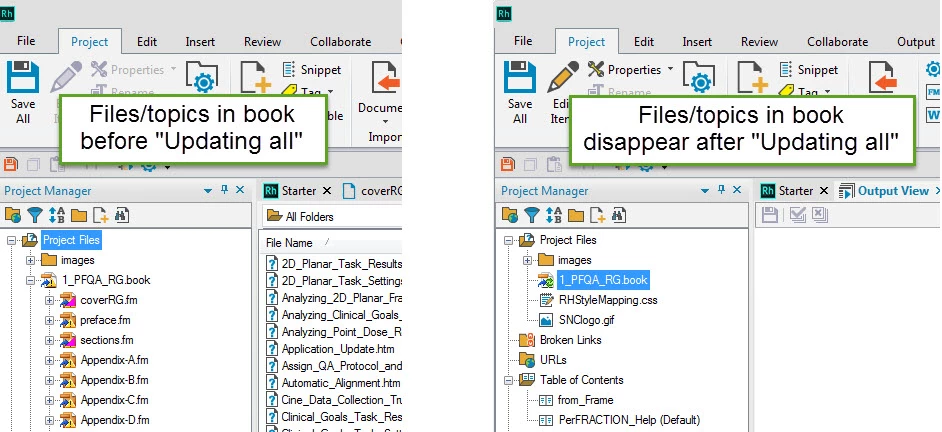
I can't find any information about this in any forums. Screenshot included below to show the effect of "Updating all" in a project. 

I appreciate any assistance with this annoying quirk! 

Carole
This topic has been closed for replies.
Correct answer surbhi_maheshwari9120543

Hi,

I have tried exactly your steps but it is working fine at my end.

Try this: In the project folder there is a file named <projectname>.cpd, delete this file and re-open the project in RoboHelp and then update the FM linked book.

Give it a try and let me know if it solves this issue.


Regards,

Surbhi Maheshwari

4 replies

LEH_0201
Known Participant
April 13, 2016

I am having exactly the same problem. Deleting the .cpd file made no difference.

The problem happens the first time I update all the files after opening a project. If I leave the project open, I can update all day long without an issue. One of my projects is rather large, so waiting for all the files to be deleted and then having to redo the update is very time-consuming. Is there anything else I can do to prevent this from happening? It almost seems like a bug.

Peter Grainge
Community Expert
Community Expert
April 13, 2016

Please clarify what you mean by "One of my projects is rather large, so waiting for all the files to be deleted and then having to redo the update is very time-consuming."

Why would you be waiting for files to be deleted?


See www.grainge.org for RoboHelp and Authoring tips

@petergrainge

Use the menu (bottom right) to mark the Best Answer or Highlight particularly useful replies. Found the answer elsewhere? Share it here.
Peter Grainge
Community Expert
Community Expert
April 13, 2016

Also you haven't stated whether or not the FrameMaker issue earlier in the thread could be the cause.

Beyond that there was another thread that sounds similar. Please take a look at that and if it seems more like your problem, please post there. In your post it would help to have a link to this thread.

https://forums.adobe.com/message/8646307?tstart=0#8646307

You will see that both Adobe and myself offered to look at the project but the poster could not share it. Can you? See the Contact page on my site and send the project as instructed there. Do make sure you include a link to the other thread and please do not email the project direct.


See www.grainge.org for RoboHelp and Authoring tips

@petergrainge

Use the menu (bottom right) to mark the Best Answer or Highlight particularly useful replies. Found the answer elsewhere? Share it here.
Participating Frequently
January 5, 2016

Surbhi, sorry. I have been out of the office for two weeks and was playing catch-up all day yesterday. I did try your suggestion this morning - I deleted the .cpd file before opening the project in RoboHelp, then generated the update for all topics. No problems at all!  Thank you so much.

Carole

Alan Houser
Community Expert
Community Expert
December 17, 2015

This may or may not be related ... when I recently migrated a FrameMaker book from FM12 to FM2015, FrameMaker 2015 initially reported that all cross-references were unresolved. In FrameMaker, I performed an "Edit>Update References" operation, which successfully resolved the cross-references.

The book was also linked to a RoboHelp project. I did not check the RoboHelp 2015 project until after I updated the FrameMaker book.

To make a long story short ... did you migrate the FrameMaker source files to FrameMaker 2015 before you updated the linked files in the RoboHelp project?

-Alan Houser

surbhi_maheshwari9120543
Community Manager
Community Manager
December 21, 2015

Hi,

I have tried exactly your steps but it is working fine at my end.

Try this: In the project folder there is a file named <projectname>.cpd, delete this file and re-open the project in RoboHelp and then update the FM linked book.

Give it a try and let me know if it solves this issue.


Regards,

Surbhi Maheshwari

surbhi_maheshwari9120543
Community Manager
Community Manager
December 17, 2015

Are FrameMaker11, RoboHelp 10 and TCS 2015 all are installed on your machine?

Regards,
Surbhi Maheshwari

Participating Frequently
December 17, 2015

Yes.