
Participant
May 28, 2014
Question

Why does RoboHelp HTML v11.0.1.235 crashes when inserting a script?

  • May 28, 2014
  • 2 replies
  • 383 views

I inserted the following script

"<noscript>

<!--Javascript is not enabled-->

</noscript>".

I used the menu options Insert > HTML > Advanced > Script. Unfortunately, RoboHelp places this tag inside the "<script>" "</script>" tags which causes errors. I was in the procces of moving the tags when RoboHelp froze. RoboHelp (HTML) v11.0.1.235 was installed on my system last week. There is an Add-on to Microsoft Visual Studio (v4.5.50938) where all the files are kept in Source Control. The contents of the problem details are below:
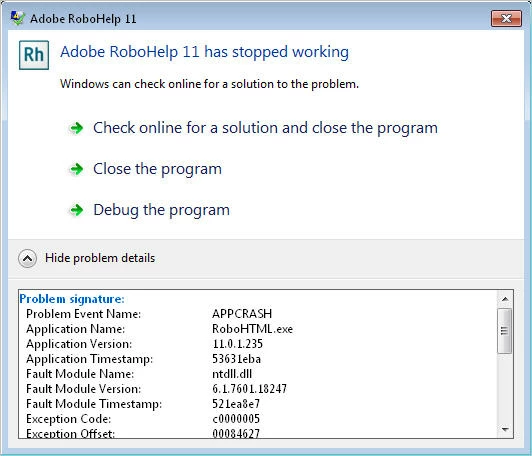
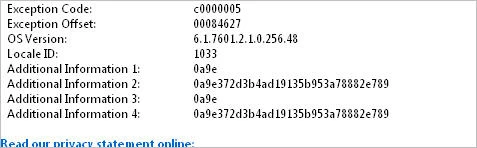
    

This topic has been closed for replies.

2 replies

AINSDOCSAuthor
Participant
June 25, 2014

The way I took care of this problem is by entering the script in a text file and copy/paste it into the HTML view. The system stopped crashing/freezing and I am able to continue with ease.

Willam van Weelden
Inspiring
May 28, 2014

This is a user to user forum, so the exception details won't say much to us.

You say you try to add a script, but you have noscript tags. Are you sure that this problem is related to those tags? It may very well be a fluke that has to do with something else.

Kind regards,

Willam

AINSDOCSAuthor
Participant
May 28, 2014

I have to update all HTML files with the noscript tag for browsers that users may have that does not support Javascript. My predecessor entered the HTML coding (script) incorrectly. by entering the text "Javascript is not enabled" at the top of each topic page in the online manual. Unfortunately, users accessing the WebHelp manual discovered that when "full text" or "word" search was performed the text appeared in the search results as part of the title of the page. When looking for assistance on how to correctly insert this tag I came across the RoboHelp Reference for entering this script. Note: I was using RoboHelp v9

Help > Contents & Index > Using RoboHelp 9 > Advanced program features > scripts

or

via URL: http://help.adobe.com/en_US/RoboHelp/9.0/RoboHTML/WS5b3ccc516d4fbf351e63e3d11aff59c8c5-7fb0.html

Script window


This is how the above is entered in a topic: (HTML view)

This is how the script/tags should appear.

The system does not freeze up every time. I can work on a few topics (maybe 5 or 6) then it will freeze. I am not sure if the problem has anything to do with inserting a script but this is the only time it freezes. I use RoboHelp on a daily basis and is in it all day long for I am a Technical Writer assigned to preparing and updating online manuals. If I am creating a new topic or updating content on a topic (Design view) the system doesn't freeze up.

Willam van Weelden
Inspiring
May 30, 2014

If you use the script window, this is what I expect you to get. If you want true noscript options, you have to manually add the tags in HTML mode. The scripts window allows you to add JavaScript but noscript is not supported in the RH interface. Perhaps the freeze is related to the noscript tag embedded in the script tag, but that's just a guess. Does RH freeze after you corrected the tags?

But why do you add this code? RoboHelp output is built in such a way that when JavaScript is disabled, it will give a warning to the user itself. So it doesn't seem to add anything y manually adding this information if you ask me.

Kind regards,

Willam