


Sleant
Inspiring
August 7, 2024
Answered

Why does the word "Master" show up in search results?

  • August 7, 2024
  • 3 replies
  • 256 views

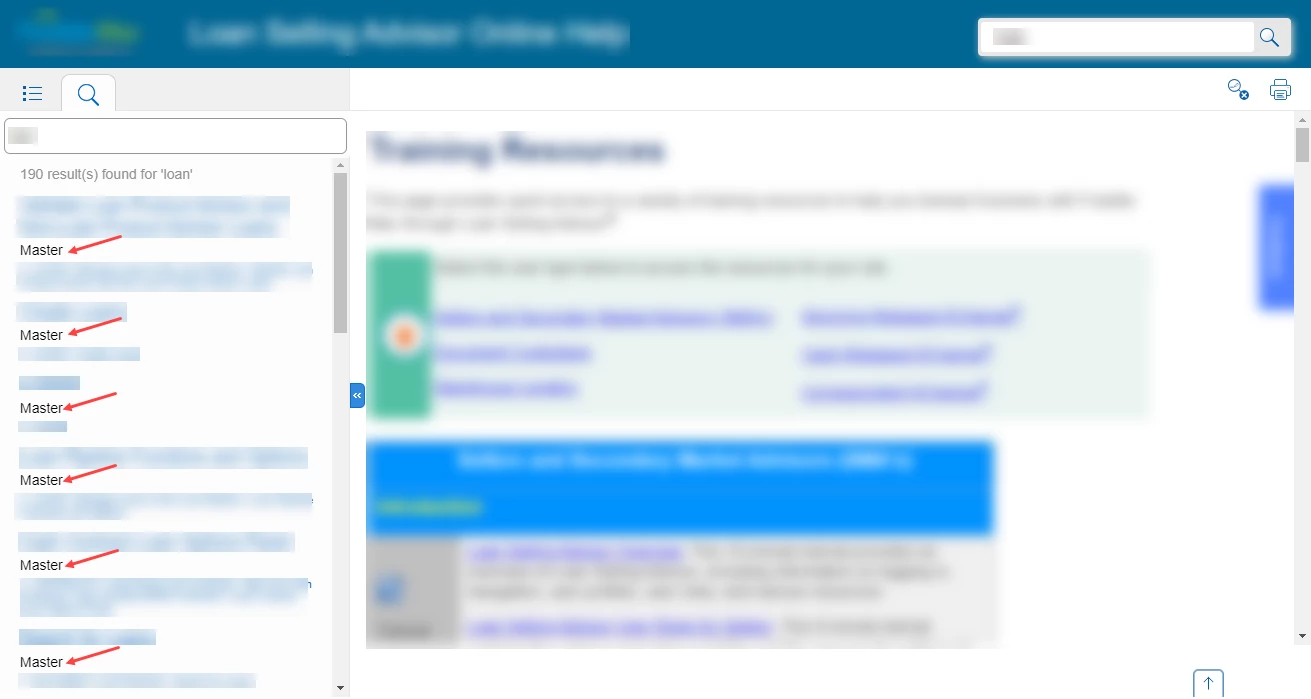
Using RH version 2022.4.179, published as HTML5 - when I entered a search term and the results display; why does the word "Master" show up in every single search result? See screenshot below. Thank you for any insight.
    Correct answer Sleant

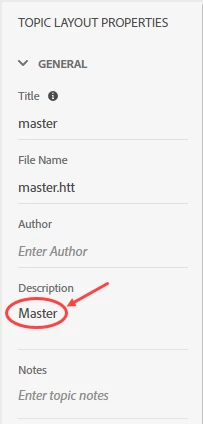
    Found the answer. I removed word "Master" in the master.htt > Topic Properties > Description > remove the word Master.

    Thank you Jeff and Peter. You're the best for our community. 

    3 replies

    Sleant
    SleantAuthorCorrect answer
    Inspiring
    January 30, 2025

    Found the answer. I removed word "Master" in the master.htt > Topic Properties > Description > remove the word Master.

    Thank you Jeff and Peter. You're the best for our community. 

    Jeff_Coatsworth
    Community Expert
    Community Expert
    August 8, 2024

    Merged help?

    Peter Grainge
    Community Expert
    Community Expert
    August 8, 2024

    I don't think so. I have never seen it do that.

    ________________________________________________________

    My site www.grainge.org includes many free Authoring and RoboHelp resources that may be of help.


    Use menu (bottom right) to mark as Best Answer or to Highlight particularly useful replies. Found the answer elsewhere? Share it here.
    Peter Grainge
    Community Expert
    Community Expert
    August 8, 2024

    That's a first. No one has ever reported that issue.


    First of all try the About RoboHelp sample project. In the new UI you should see them on the Starter Screen but if not click Open Project and browse to Documents and then My RoboHelp Projects. That should confirm the issue is your project rather than something in RoboHelp itself.. The issue is then what and on this one I am struggling to think what you could have done.


    1. Do you have a Topic Layout linked to your topics? They used to be called Master Pages so perhaps there is something in that.
    2. Set up Find and Replace with these settings.
    3.  If that does not help, can you share the project? If you can, then see the Contact page on my site and send the project as instructed there. Do make sure you include a link to this thread and please do not email the project direct.
    4. If you cannot share, and my suggestions do not help, you will have to try Adobe Support. They will need to see the project though. See https://helpx.adobe.com/contact/enterprise-support.other.html#robohelp for your Adobe Support options. The email link tcssup@adobe.com is recommended as it reaches a team dedicated to Technical Communication Suite products including RoboHelp.


    Do let us know what you find. 

    ________________________________________________________

    My site www.grainge.org includes many free Authoring and RoboHelp resources that may be of help.


    Use menu (bottom right) to mark as Best Answer or to Highlight particularly useful replies. Found the answer elsewhere? Share it here.