

camilaf3199346
Inspiring
August 3, 2018
Answered

Why font size is different in my CHM file?

  • August 3, 2018
  • 2 replies
  • 1352 views

I have been using RoboHelp 2017 and dealing with the following situation: I have a help with certain topics that show different font than applied to it. I can't understand the reason because I have been using the same Styles and Formatting applied to all topics, but only some of them have this discrepancy.

I will illustrate it to make it easier to understand.

This is my list how it appears when editing my topic in RoboHelp (correct font size);

However, when I generate a Microsoft HTML Help output (CHM file), this is how the same text appear:

I don't know how it happens and only on some words... If the same style is applied to all sentences...

Maybe someone can help me.. I am trying to fix it. Thanks in advance!
This topic has been closed for replies.
Correct answer camilaf3199346

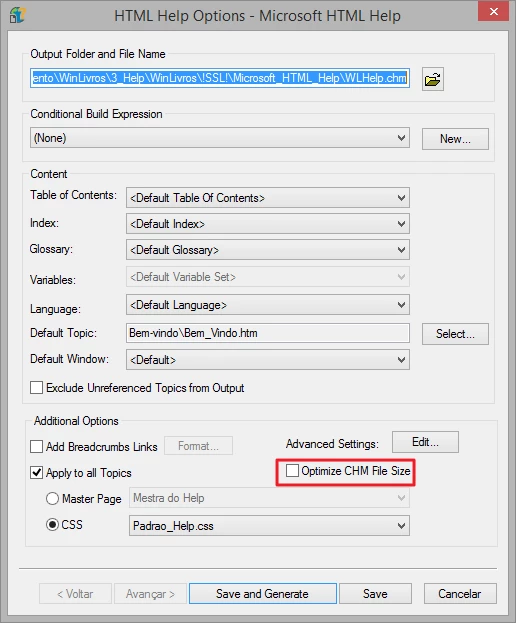
I have solved it \o// I unchecked this option "Optimize CHM File Size" and then generated it again. Then it worked \o/ texts are back to the same font size. Finally! I didn't understand how this parameter works... Maybe someone will understand it and can explain it better. However, it has worked. =D

2 replies

camilaf3199346
camilaf3199346AuthorCorrect answer
Inspiring
August 3, 2018

I have solved it \o// I unchecked this option "Optimize CHM File Size" and then generated it again. Then it worked \o/ texts are back to the same font size. Finally! I didn't understand how this parameter works... Maybe someone will understand it and can explain it better. However, it has worked. =D

Captiv8r
Legend
August 3, 2018

Clearly when this option is disabled (no check mark present) the resulting CHM is larger. Likely because that text is big and bold and fluffy and takes up more room! So when you enable the option in an effort to make the CHM smaller, it has to compress things so they take up less space. In this case, your nice fluffy bold text was collapsed to tiny text so it consumes less space and therefore creates a smaller CHM file.

I'm just messing with you. I don't really have a clue exactly what that option does myself. It's a bit of a mystery.

But I'm happy you got it sorted!

Cheers... Rick

camilaf3199346
Inspiring
August 6, 2018

Another mystery, just like that...

Captiv8r
Legend
August 3, 2018

Perhaps it would be helpful if you were to right-click the topic inside the CHM file and choose to view the source code behind it.

camilaf3199346
Inspiring
August 3, 2018

Hi, Rick! I have done it but I didn't find anything unusual in the code.