
December 14, 2011
Answered

Why is it suddenly impossible to open my RoboHelp 8 HTML project?

  • December 14, 2011
  • 2 replies
  • 1197 views

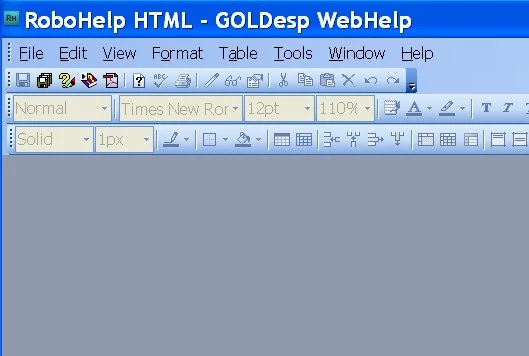
The project that I've been working on - for years - this  morning failed to open in RH8, all I get is a RoboHelp window with the correct project title at top, but totally blank - nothing except "Ready" in the bottom messagebar!  No message, no warning, no tabs, no topics, nothing (screenshot below). 

I last worked on it the evening before.

Of course, this project is the Online Help for our software, which is due for release very soon, and I am the only Tech Writer in the company .. so rescuing the project is urgent.

Some facts to start with:

  • Version is RoboHelp HTML 8.0.2.208, running on Windows XP, using MS Office 2007.
  • The source files for the project are kept in SVN, which has been working fairly well, as it keeps the working files on my C drive. I commit the changes into SVN (the only possible change is that I've been more careful in the past few days to commit the project each morning before opening it)
  • Nothing else has changed recently, except for the usual updates of content in the topics.

  • A colleague who doesn't work on this project checked out my project files from SVN and succeeded in opening the project on his PC -- so the problem is likely not in the project itself.
  • A RoboHelp 8 for Word project, also in SVN, DOES open successfully on my PC.

These are the steps I've tried so far, without success:

  1. Reverted to previous day's version of the project in SVN
  2. Deleted the (huge, almost 41MB) project .CPD file, and double-clicked on the .XPJ file
  3. Rebooted my computer.
  4. Uninstalled RoboHelp 8.02, 8.01 and 8, and re-installed RoboHelp 8 from the CD, downloading the 2 patches 8.01 and 8.02.
  5. I did NOT install files that Adobe suggested, whutils.js, since I wasn't sure if they are truly for RH8, and we don't use JavaScript in the project.

If anyone can suggest what might be happening, I'd be so very grateful.
This topic has been closed for replies.
Correct answer Amebr

I don't have RH8, but these steps should be similar.

Try File > Load Default Environment.

Amber

2 replies

Anjaneai_Srivastava
Adobe Employee
Adobe Employee
December 14, 2011

Amebr has made a good suggestion, it could be just the Environment has been customized, but I guess it should not be the case after you reinstalled the complete Application.Though you can recheck by Going to View---Pods-- Select Project Manager and Topic List

Try opening any other project to see, if every project is behaving the same way or not?

Please make sure you have back up of complete project before trying this--

1) Move the CPD and XPJ file file out of the Folder and Right Click on HHP file and Open with -- Robohelp 8

2) If it gives you prompt stating you have existing XPJ, file would like to use it ?  Say -- No.

It would launch back you project, verify if your are able to see your project files?

Thanks,

Anjaneai Srivastava

Peter Grainge
Community Expert
Community Expert
December 14, 2011

I would hold back on moving or deleting the XPJ until all other avenues have been tried. See Opening Projects on my site. You will lose stuff if you delete the XPJ; it can be recovered but it's extra work if one of the other solutions works and it was not necessary.


See www.grainge.org for RoboHelp and Authoring tips

@petergrainge

Help others by clicking Correct Answer if the question is answered. Found the answer elsewhere? Share it here. "Upvote" is for useful posts.
December 14, 2011

Thanks for stepping in with the warning, Peter.

This is the first time I've asked a question on this Forum, and I'm so impressed with the speed and quality of the responses!

Judith

AmebrCommunity ExpertCorrect answer
Community Expert
December 14, 2011

I don't have RH8, but these steps should be similar.

Try File > Load Default Environment.

Amber

December 14, 2011

Amber,

Thanks so much, this was the answer!  A huge relief, though I should have known better myself

Community Expert
December 14, 2011

No problem. I've been caught out by that one myself.