
Why is the automatically generated RoboHelp TOC limiting itself to the top 2 topic levels?
I'm using TCS 4 with RoboHelp v10.0.1.292 and FrameMaker v 11. I created some dummy DITA files in FrameMaker11 using the default choices and organized them in a ditamap to learn how to work with multiple topic levels. My ditamap has 3 topic levels. All 3 levels display in RoboHelp's Project Manager, however only the first 2 levels display in the automatically generated TOC. (After generating WebHelp output, I can do a search and find the 3rd level content, but the 3rd level topics are not displayed in the WebHelp TOC either.)
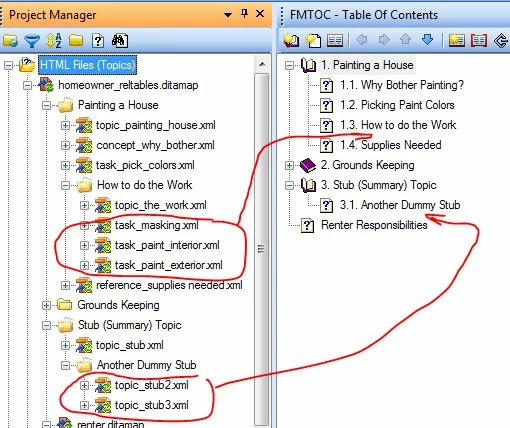
First graphic: 3rd level files in Project Manager pod match how they are arranged in FM, and where they failed to show up in the FMTOC pod.
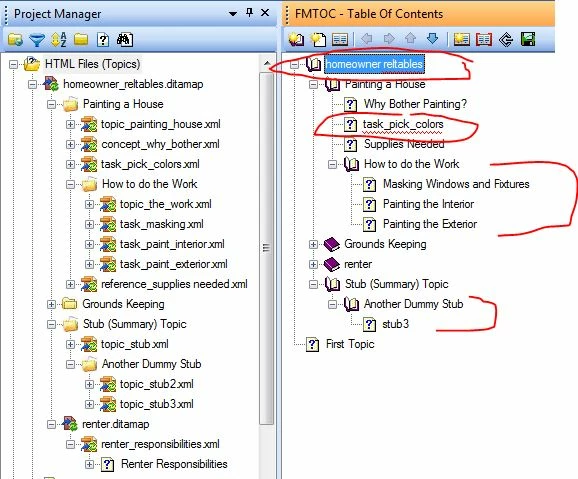
Second graphic: I found that I can get the 3rd level to display in the RoboHelp TOC and in WebHelp output if I click the TOC pod AUTO-CREATE TOC icon - is this the solution or is there something I just haven't got set up yet? If regenerating the TOC in RH is the solution, how do I get the accompanying file name problems to go away, i.e. the ditamap FILE name now replaces the ditamap TITLE, and worse, one of the task file names has replaced its title name.
Thanks for any clues you can provide.


 AdChoices