
Known Participant
September 10, 2018
Question

Why must I append index.htm to one of my KBs?

  • September 10, 2018
  • 1 reply
  • 564 views

I have several KB's I've created and published over the years, and only have this issue with one. Since I'm moving to a new windows server, i'd love to resolve this issue. On the old server, I always had to type wpahelptest.mot-mobility.com/index.htm to get it to open. I still have to do this, and it's annoying. I can partially solve it, but would love to understand what's wrong and how to resolve.

The first page is named "welcome"
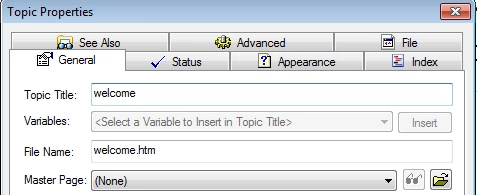
After uploading to the new, I had the same issue. So I added welcome.htm & welcome.html to my IIS default document.

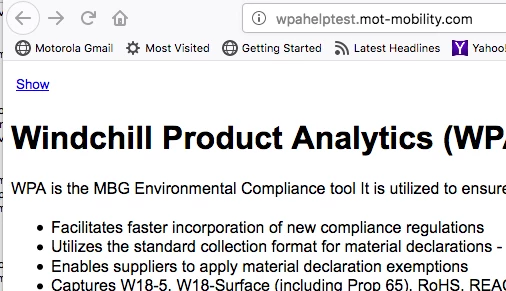
Now, if I enter just wpahelptest.mot-mobility.com, the page opens, but the frame & contents are not here - I have to click on "show"
This topic has been closed for replies.

1 reply

Captiv8r
Legend
September 10, 2018

HI there

This would seem (to me at least) to be a server configuration error. As I understand it, index.htm is a standard and default "starting page" that the server (if properly configured) should simply load up and present.

The bottom line here is that I believe you need to be asking your web folks that are responsible for maintaining the server about the issue. Just explain that you are typing wpahelptest.mot-mobility.com and you have an index.htm but it isn't loading up.

Cheers... Rick

AnahidMAAuthor
Known Participant
September 11, 2018

Hi Rick,

Okay - but does it make sense it works for every other KB, but not this one? I feel like I must have something wrong.

And then when I added welcome.htm, it did show the start page, but not the frame, just as if I had done a right click open URL in a new page. But I have no idea what I've done wrong on this one! Should I rename my start page to index.htm? The old person I worked with told me to name it welcome, but I don't think that should make a difference

Peter Grainge
Community Expert
Community Expert
September 11, 2018

The web recognises certain defaults that don't need to be typed in.

www.mywebsite.com/index.htm only needs www.mywebsite.com to be typed in.

www.mywebsite.com/welcome.htm needs to be entered in full.

There are other words but welcome is not one of them.

I wonder if this is the cause? I would expect it to fail completely rather than as you describe.

There's more at Basics of the Index.html Default Webpage Scroll down to Other Default Page Names in particular.


See www.grainge.org for free RoboHelp and Authoring information.

@petergrainge

Use the menu (bottom right) to mark the Best Answer or Highlight particularly useful replies. Found the answer elsewhere? Share it here.