
Window display issues with Webhelp/Webhelp Pro output
Hello,
I've created a couple webhelp projects after being told by our QA/Development team that the projects I created in HTML5 format were not compatible with 1.) legacy versions of IE [specifically 7 and 8 - posted another discussion on this over the past couple months, tried the shiv patch to no avail] and 2.) the control used by the program to display an HTML file set on a given [iOS] device - from what I'm told, this applies to iOS 7 and there is supposed to be a new version of the control in iOS 8 that does support the HTML features. But we're not there just yet (still need to support iOS 7), so per QA/DEV request, I created the webhelp projects to see If these work and display better on the devices.
I've noticed some display issues when I generate and view the webhelp output. Initially, the books in the TOC are cut off and I have to resize the TOC pane and slide the scroll bar at the bottom of the display window to see them. But when I do this, the button for the Search field in the toolbar gets cut off. Also, the initial vertical scroll bar displayed on the right hand side of the window applies to the full window. In other words, I can't use it to scroll up or down in the displayed topic. Again I have to resize the window overall or slide the bottom scroll bar all the way to the right, at which point I can see a partial "hidden" vertical scroll bar for the topic window.
The window properties dialog for creating/editing a window for either webhelp or webhelp pro doesn't provide much in the way of customization or anything I can see related to these issues.
Can anyone offer some suggestions on how I can get the window to display properly?
Thanks in advance for any help you can provide.
Sincerely,
DH
 . But you can now use the one scrollbar to move up and down in the topic as you would expect.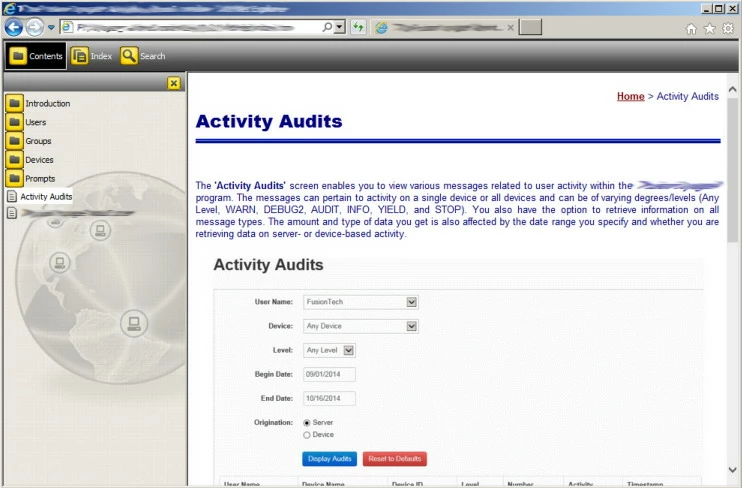


 AdChoices