

BrentKilboy
Participant
September 24, 2019
Question

Word import bookmarks have IDs instead of text

  • September 24, 2019
  • 5 replies
  • 415 views

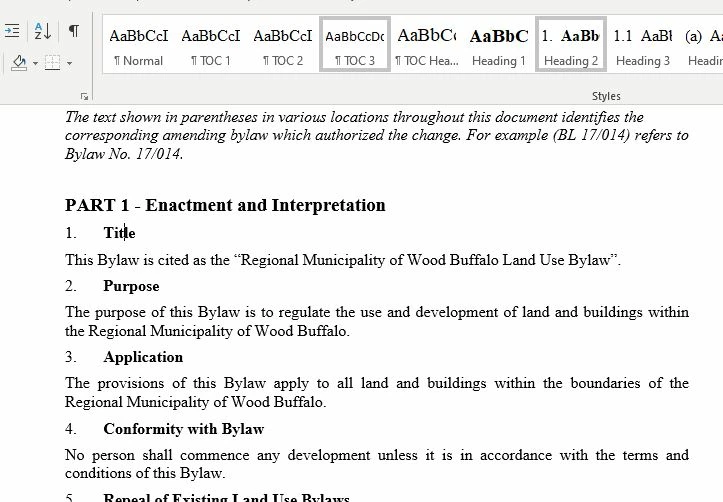
I'm new to RoboHelp, I'm trying to import a Word doc and it's "Almost" what I want, but the bookmarks import as an ID like _Toc363044838 instead of the text of the heading that was in Word. I can't see a way to make these import correctly. Any ideas?
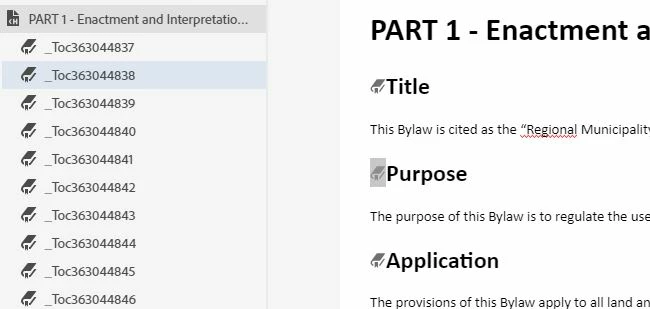
How it looks in Word:
This topic has been closed for replies.

5 replies

Community Expert
September 26, 2019

It sounds like a bug to me. You can log a ticket here : https://tracker.adobe.com/

Jeff_Coatsworth
Community Expert
Community Expert
September 25, 2019

Ok in Classic it's the 3rd icon from the left (looks like an open book) & the mouse over says "Auto-create TOC" - select that & it offers an option to "Create TOC pages for mid-topic links (bookmarks)".
In the New UI, it's that black icon that looks like a clipboard when you edit the TOC.

BrentKilboy
Participant
September 25, 2019
Yep, I got the auto TOC, but like I said, in RH New, it creates all of the TOC 2nd level items as just ID's. See my original post.
Jeff_Coatsworth
Community Expert
Community Expert
September 25, 2019

Since you didn't tell it to paginate on the second level headings (like "Title" "Purpose" "Application" etc.), I wouldn't expect it to build a ToC with the second level headings. Have you tried just running the "auto-build ToC" tool in RH? IIRC you can specify including bookmarks as second level ToC items.

BrentKilboy
Participant
September 25, 2019
Ya, that's what I was saying in RH New, it creates the bookmarks for the 2nd level, but they all have ID's as their name instead of the text of the heading 2's. If you are talking about RH Classic, I can't see how to auto create the bookmarks from the heading 2's at all!
BrentKilboy
Participant
September 25, 2019

I tried in Classic, and the import there doesn't create any bookmarks at all,  it only creates the top level table of contents entries.

Not sure if it's called something different in classic cause I don't really see any option for bookmarks. I want the nested TOC like in my original post still, trying to do a HTML5 output of this large doc with a lot of sections.

Community Expert
September 25, 2019

I wouldn't expect any settings to affect this, however I haven't used the import feature in RH2019 New yet. 


Could you create a test project in a RH2019 Classic to see if it imports with the heading text? In RH11 I get the heading text, and Classic is closer to RH11 than RH2019 New. This test might help rule out something specific to your document.