


Participant
March 10, 2021
Question

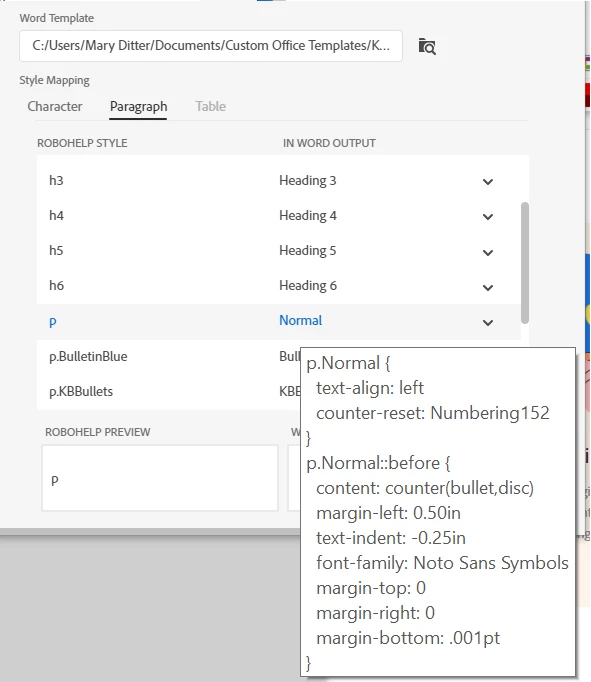
Word output creates Normal style with .001pt spacing and bullets that are not in the template.

  • March 10, 2021
  • 1 reply
  • 241 views

Making Word output from a simple project. Apply the KB Blank.dotx template, where spacing to 0 before and 10pt after, as shown below. No bullets. When I look at the RH conversion from p to Normal, it shows .001pt spacing after and bullets. (added shot of that below too.) The resulting document uses the .001pt spacing, bullets, which then causes further problems with other styles based on Normal. This happened with several templates. Work around for spacing changed the value to the correct one. And that worked. 
Settings in the KB Blank.dotx as seen in Word! Very confusing. Very bad. Please shed light on this issue.

    This topic has been closed for replies.

    1 reply

    Adobe Employee
    March 10, 2021

    Hi Mary,


    Can you please send us this word template?

    Let us check and come back to you. You can inbox me on forum or email me at sumahesh@adobe.com 


    Thanks and Regards,
    Surbhi Maheshwari

    MaryEADAuthor
    Participant
    March 10, 2021

    Hello Surbhi Maheshwari, 

     
    Thank you for the quick response. I've sent the template, as requested by email.  In addition, I've attached a more simple template (Technical Bulletins.dotx)  that only resulted in the spacing error, not the bullets. That may help you debug the issue more easily. 
    Additional information that may be helpful is that the templates have worked well for several documents. 
    I look forward to resolving this issue. 
    Regards, 
    MaryEAD