


Participant
February 1, 2022
Question

Word publish autonumber problems

  • February 1, 2022
  • 1 reply
  • 109 views

Hello!

I’ve a problem with Word publish after the update 7 of RH2020.

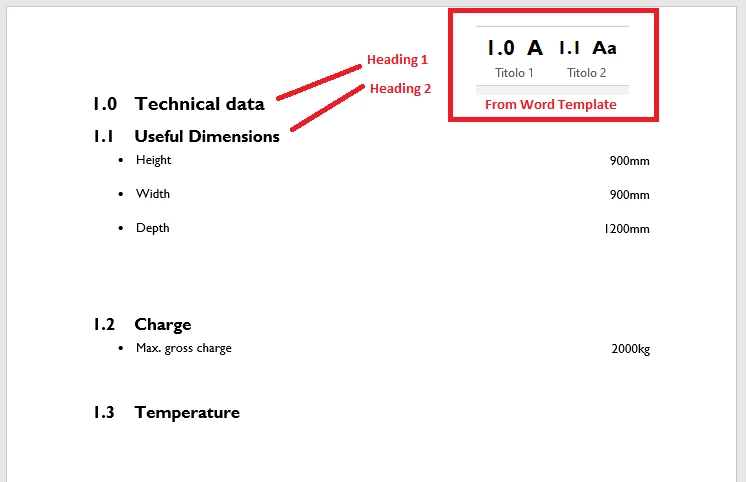
In update 6, I was exporting from RH using a Word template with the option to map styles from RH to Word. In the template I had modified the Heading 1 and 2 styles to get a multilevel numbered list, aligned to the right. Everything worked correctly, see the example image of the result.


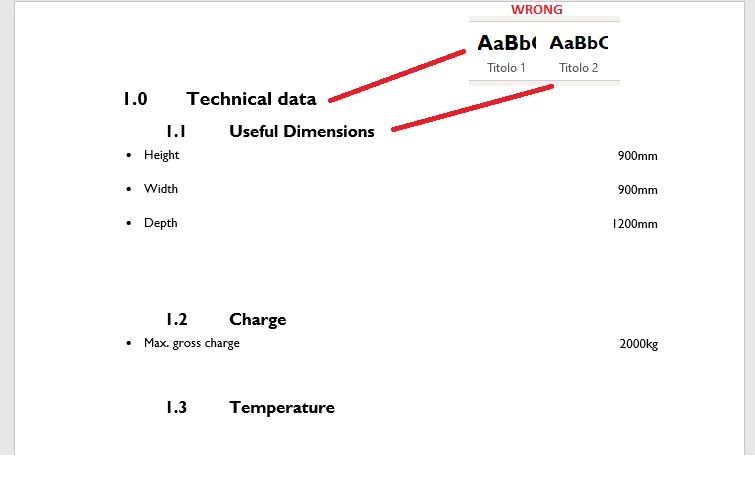
Now, nothing has been touched and with the same option to map RH Style to Heading 1 and 2, the export is not correct, i get no number and a blue text color.

If i then choose to “Use RH style”, the output numbering is correct but the styles from the template are being modified (no more number) and the alignments are wrong.
 

In RH I can set up the left margin, for the text and for the numbering (in the h1:before section of the CSS) and I see changes on RH but they are not exported to the Word.

On the other hand, for example the top and bottom margins are exported correctly, so I can’t understand what’s wrong.

Thanks

    This topic has been closed for replies.

    1 reply

    Peter Grainge
    Community Expert
    Community Expert
    February 1, 2022

    As far as I am aware nothing changed in Update 7 to affect autonumbering. There were some changes in ordered and unordered lists but they were not made in autonumbering. As you have not changed anything, I can't see any reason for this.


    I think you will need to take this one to Support. See https://helpx.adobe.com/contact/enterprise-support.other.html#robohelp for your Adobe Support options. The email link tcssup@adobe.com is recommended as it reaches a team dedicated to Technical Communication Suite products including RoboHelp. 

    ________________________________________________________
    My site www.grainge.org includes many free Authoring and RoboHelp resources that may be of help.

    Use the menu (bottom right) to mark the Best Answer or Highlight particularly useful replies. Found the answer elsewhere? Share it here.
    RoboTAVAuthor
    Participant
    February 1, 2022

    Thanks Peter, I wrote to tcssup.

    For completeness, this is my preview in RH with its HTML:

    This is the CSS for h1 and h2:

    I've included also this in the email.

    Thanks for now.