


Inspiring
November 17, 2021
Question

Wrong Topics Displaying in TOC

  • November 17, 2021
  • 18 replies
  • 352 views

Hi. I'm using RoboHelp 2020.6.76 on a Windows 10 machine.


I'm having an odd problem with my published Table of Contents. Topics are being displayed in a section where they shouldn't be, completely replacing the topics that should be there. 


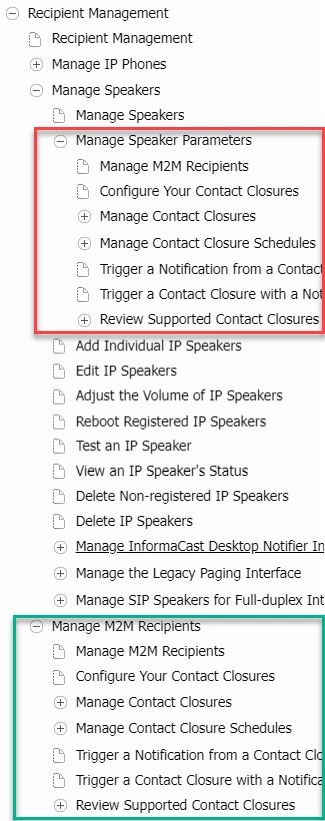
The following picture shows the TOC in my published output. The red box is around the topics that are in the wrong place. The Manage Speaker Parameters section is correct, but everything under it about M2M and contact closures is wrong, and the topics that should be there are missing. Further down the image in the green box, the M2M topics are in the right place and order, as expected.
 

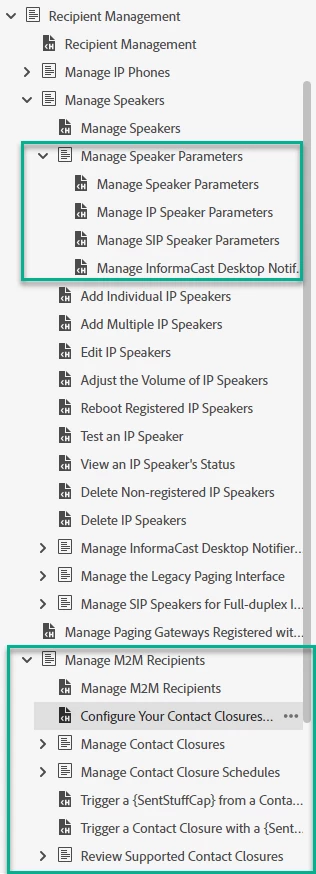
The following image is from my project's TOC, which is displaying correctly. The first green box is around the contents that should be displaying under the Manage Speaker Parameters section (the part that's wrong in my published output TOC). The second green box is around the M2M/contact closures content, which is in the right place and displaying correctly. 
What's going wrong between my project and my published output? Everything is correct in my project, but goes awry in the published output.

    This topic has been closed for replies.

    18 replies

    Peter Grainge
    Community Expert
    Community Expert
    November 18, 2021

    The update of javascript files can take several hours. I have that issue with the javascript menu top right on my site.


    Has it cleared today?

    ________________________________________________________
    See www.grainge.org for free Authoring and RoboHelp Information

    Use the menu (bottom right) to mark the Best Answer or Highlight particularly useful replies. Found the answer elsewhere? Share it here.
    Community Expert
    November 18, 2021

    You need to clear Cached Images and Files (chrome setting - other browsers have similar)

    Inspiring
    November 18, 2021

    Hi Amebr.


    I tried opening the help in an incognito/private browser window. That didn't solve the problem.


    Then I tried clearing my cookies and site data, closing the browser, waiting a few minutes, and reopening the help. That also didn't solve the problem. 

    Community Expert
    November 18, 2021

    It's a server caching problem. Usually getting the user to clear their browser cache, close the browser, wait a couple of minutes and try again fixes it.


    I think it's because the toc content is stored in javascript files which are typically cached long term (because js files "dont" change). I'm currently experimenting with setting a short server http header max-age for the whxdata folder, where the relevant files are stored. I tried 14 days but that wasn't acceptable, so I'm now trying 1 day, but may set it to zero depending on how it goes.


    Inspiring
    November 17, 2021

    To be sure that we're seeing the same Related conversations, this is what I see: 

    These are not the same problem I am having. 

    Peter Grainge
    Community Expert
    Community Expert
    November 17, 2021

    See the Related Topics. If that's not it I'll look in the morning.

    ________________________________________________________
    See www.grainge.org for free Authoring and RoboHelp Information

    Use the menu (bottom right) to mark the Best Answer or Highlight particularly useful replies. Found the answer elsewhere? Share it here.
    Inspiring
    November 17, 2021

    Hi Peter. Any chance you remember the resolved posting? I did search for an answer before posting myself and didn't see anything.

    Peter Grainge
    Community Expert
    Community Expert
    November 17, 2021

    Someone posted a similar question recently and I'm pretty sure it was resolved. 

    ________________________________________________________
    See www.grainge.org for free Authoring and RoboHelp Information

    Use the menu (bottom right) to mark the Best Answer or Highlight particularly useful replies. Found the answer elsewhere? Share it here.
    Jeff_Coatsworth
    Community Expert
    Community Expert
    November 17, 2021

    I had a nagging feeling that this one had happened before too - but I can't remember the thread.