
andrem2903623
Known Participant
April 15, 2019
Answered

Your system requires SMB2 or higher.

  • April 15, 2019
  • 2 replies
  • 13414 views

Hello,

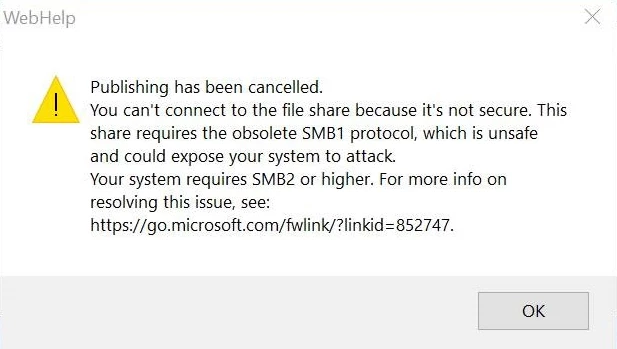
We have run into a publishing issue. Here is the error message.

Publishing has been cancelled.

You can’t connect to the file share because it’s not secure. This share requires the obsolete SMB1 protocol, which is unsafe and could expose your system to attack. Your system requires SMB2 or higher. For more info on resolving this issue, see:

https://go.microsoft.com/fwlink/?linkid=852747

We are running RoboHelp 11

Windows 10 Enterprise

8 Gig RAM

64-bit

Our company is upgrading to the newest version of Windows 10, and it is not letting us publish to our folder on our server. Is there a patch for the SMB 1 and SMB 2 issue for RoboHelp 11?
    This topic has been closed for replies.
    Correct answer Amebr

    Andre, can you check with your IT guys that the location you are publishing to is set up as SMBv2? To me, the message indicates that the server is configured for SMBv1.

    So if they are concerned about SMBv1 security, wouldn't that also need to be updated?

    It's also possible the message is wrong (it wouldn't be the first time MS has been unclear), but it wouldn't hurt to ask the question to be sure.

    2 replies

    Community Expert
    April 16, 2019

    If I'm reading the article right, MS has automatically uninstalled client-side SMBv1 from Windows 10, but the server is still set up to use SMBv1. So I *think* your IT guys either need to install client-side SMBv1 on your PC OR upgrade the server to SMBv2 or above. The article you linked should be all they need to figure out what they need to do.

    andrem2903623
    Known Participant
    April 16, 2019

    Hello Amebr,

    Thank you for the reply. I will forward the link to IT and hopefully they can use the information to help resolve this issue. If it works, I will let this post know, so others will have a resolution. Thanks.

    Peter Grainge
    Community Expert
    Community Expert
    April 15, 2019

    I have not seen anyone report these errors and I don't recall seeing them

    mentioned in any patch.

    I think you need to liaise with your IT people on this.

    Peter Grainge

    www.grainge.org

    @petergrainge

    Use the menu (bottom right) to mark the Best Answer or Highlight particularly useful replies. Found the answer elsewhere? Share it here.
    andrem2903623
    Known Participant
    April 16, 2019

    Hello Peter,

    Thanks. I will see if IT can do anything to resolve this issue. I am surprised no one else has ran into this issue.