Participant
March 15, 2021
Answered

Cannot get latest changes in Team Project even though Premiere detects newer versions

  • March 15, 2021
  • 2 replies
  • 2762 views

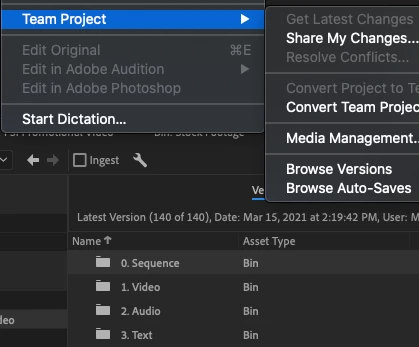
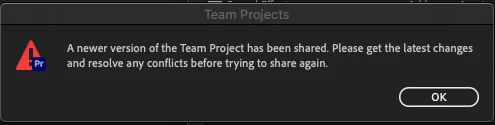
I am unable to share my changes since Premiere detects new changes from my team member. However, I am not able to get the latest version of the team project since the "Get Latest Changes" button is disabled.

Browsing through versions, I do see the newer versions from my coworker but cannot update my project. 
This topic has been closed for replies.
Correct answer Tahra5E22

Hi Udo,

Thanks for responding.

After I restarted, I also updated all my Creative Cloud apps and upgraded to Premiere v.15. The issue was resolved.

I set up the Team Project which has been mostly syncing fine for several weeks. 

All collaborators were on version 14.x of Premiere Pro. 


2 replies

Adobe Employee
March 15, 2021

Hi Tahra,

Sorry, for your troubles with Team Project. In order to help you troubleshoot the issue could you please provide answers to following questions:
Does the issue persist after restarting your machine?

Do all collaborators run the same version of Premiere Pro?
Did you setup the Team Project or did someone invite you?

Thank you,

Udo

Udo Pawlik  |  Sr Software Product Quality Specialist |  Adobe  |  upawlik@adobe.com

Tahra5E22AuthorCorrect answer
Participant
March 16, 2021

Hi Udo,

Thanks for responding.

After I restarted, I also updated all my Creative Cloud apps and upgraded to Premiere v.15. The issue was resolved.

I set up the Team Project which has been mostly syncing fine for several weeks. 

All collaborators were on version 14.x of Premiere Pro. 


Adobe Employee
March 16, 2021

I'm glad the issue resolved itself and thank you for posting back!
-udo

Tahra5E22Author
Participant
March 15, 2021

Things I've tried to do: 

  • close and open Premiere Pro and After Effects twice
  • asked my coworker to share another change. My version browser sees this new change as well but the Get Latest Change button is still disabled
  • waited 1 hour to see if the button would suddenly be enabled


Still not able to get the latest changes.