



Cannot Open Team Project?
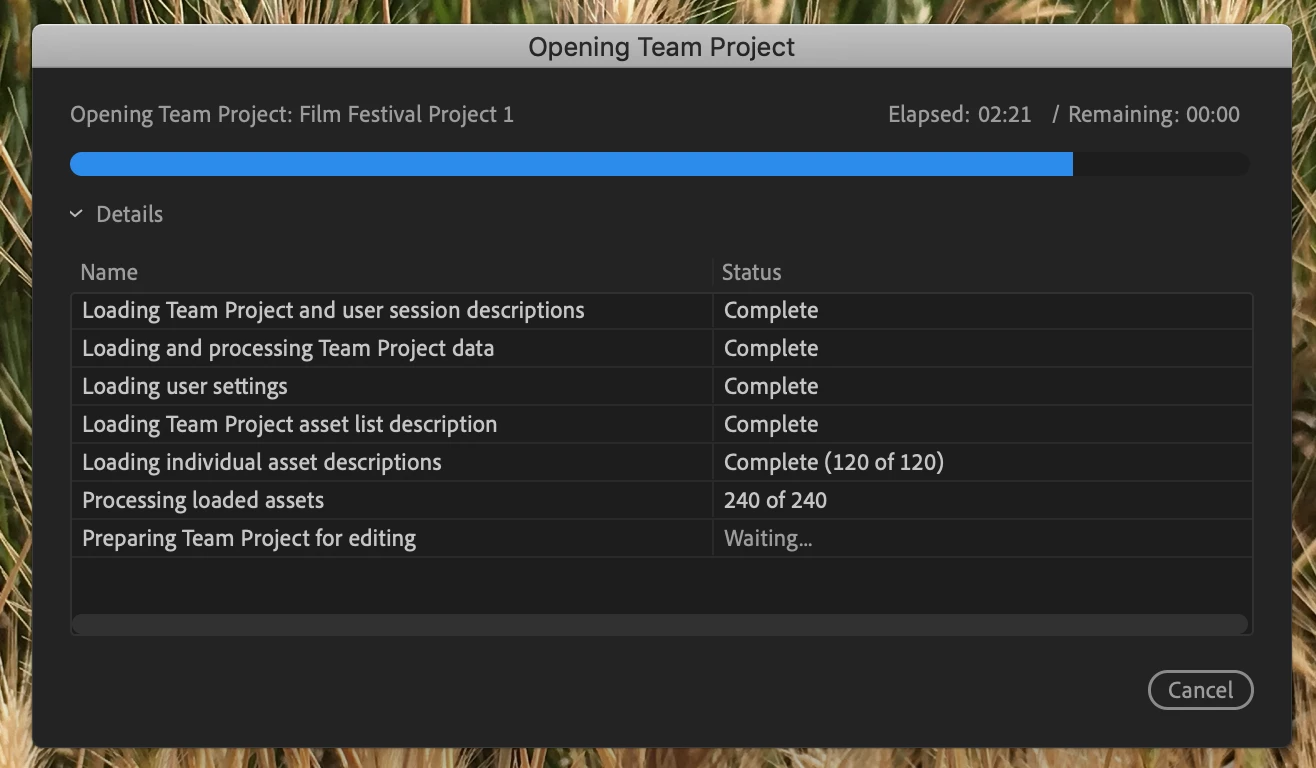
(using a 15-inch Macbook Pro version 10.14.3 / Premiere Pro is version 13.0.3 (Build 9))
Hey, so I've been searching online for help regarding this issue, but it seems like no one else has had such a problem.
Basically, a partner (for this school project) and I have been utilizing Premiere Pro's Team Project feature in order to collab and edit this video together at separate locations. Everything was going relatively fine, it took a while for us to figure out how Team Projects worked in terms of Media Management and all that, but that's a standard learning curve.
THEN, the project just.. stopped working for me. I think that my partner had made some changes and I had made some changes, too, so when trying to incorporate them at the same time, the project just froze? So I closed the program and then tried to reopen it, and now what happens is in the picture above.
Every time I click on the Team Project, the regular loading screen (shown above) pops up for a split second and then it just immediately goes back to the Project Select screen. Now, I've tried a lot of things to fix this. I have closed and reopened Premiere multiple times to no avail, I've restarted my computer a couple times, and now I've updated Premiere to the latest update Adobe has to offer.
After updating Premiere, now the team project loading window (in the picture) has stayed up rather than disappear. But the project still doesn't load, and it's been loading for half an hour as of me writing this. As can be seen in the screenshot given, all components of the Team Project have successfully loaded except for the one labeled Preparing Team Project for Editing, which is still "Waiting..."
Can anyone help with this issue? I'd like to help my partner edit this project again.
 AdChoices