



Elliot David Foster
Participant
February 17, 2022
質問

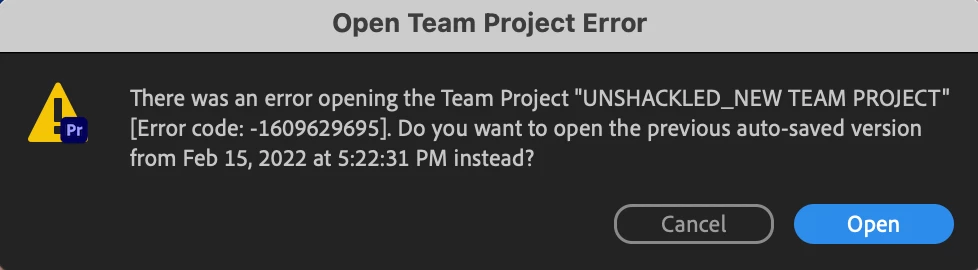
Error opening team project - error code: - 1609629695.

  • February 17, 2022
  • 返信数 8.
  • 1639 ビュー

Hi all


We are working from team projects for various different docu-seies and are finding that some open without any issues but others are popping up with the eror code listed above. It wont open the TP and then fails at opening any of the previous auto-save version as well. Does anybody know if this is an issue with the new version of premiere or perhaps the new MACOS operating system Monterey? 


Any guidance on this would be greatly appreicated. 


Best


[Moderator note: moved to best forum.]

このトピックへの返信は締め切られました。

返信数 8

Participant
April 26, 2024

Hey there, having the same problem, was working on a project and clicked on CTRL Z. Doing this erased my whole media in my sequence bar, then tried re opening a backup save of the team project and its just giving me the same error code. It's been 2 years since this thread started, adobe please tell me you now have a fix...

Adobe Employee
March 3, 2022

A fix for this issue is available in the latest Premiere Pro (Beta) build. 
Feel free to post back here or contact me directly if the issue still reproduces.


Best,
Udo

Udo Pawlik  |  Sr Software Product Quality Specialist |  Adobe  |  upawlik@adobe.com

Participating Frequently
April 18, 2023

Hello Udo, reaching out because I'm facing this issue working with a team project in Premiere 23.0 ... When I attempt to open the team project, I get this error message. When I attempt to open the recommended autosave, it keeps failing and recommending prior autosaves. I was able to access the team project by signing into my computer with a different user, but that's more of a workaround than a fix. Any ideas?

Adobe Employee
April 19, 2023

Hi, have you tried opening a previous Version instead of an 'Auto-Save' instance - View versions of team projects?

Difference between "Auto-Saves" and "Versions":
- Auto-Saves are created for each edit on your machine
- Versions are created each time a collaborator shares/publishes changes

Udo

Adobe Employee
February 28, 2022

Hi, it seems this bug is specific to cases where a local .prproj with preview files was converted to a Team Project. We're currently working on a fix and will make it available in the Beta builds soon.

A possible workaround is to delete the video previews before converting the local .prproj to a Team Project or downgrading to the previous Premiere version.

Regards,
Udo

Udo Pawlik  |  Sr Software Product Quality Specialist |  Adobe  |  upawlik@adobe.com

Participating Frequently
February 21, 2022

I'm having the same issue. Haven't been able to find a solution. Downgrading to 22.1.2 allows me to open the project, but it crashes Premiere immediately.


Also, even when I create a new team project and go into the old one and move all the media over, I get the same issue with that new project when I close it and try to reopen it.

Participant
February 21, 2022

Hi All !


We have had the same error lately. It has begun when I tried to open the team project on february 19th.

The same error happened on both side, we are editing on 2 differents PC on Premiere Version 22.2


I have tried going back to Premiere Version 22.1.2, and it worked.


All the best.

Seb

Franck Payen
Inspiring
February 21, 2022

I'm curious about the possible resolution of these issues in a future prerelease version of Premiere Pro, Hope to see this fixed in beta in the backlog…

Participant
February 18, 2022

We are having the same issue, everything was going fine for weeks, now we are getting this error message every time we open the project on either end. The progess bars come up... and it looks like it is trying to sync and share updates but it doesn't. We tried sharing another project and none of the assets showed up at all. The project was blank inside. Any ideas??

Adobe Employee
February 18, 2022

Hi,

Have you tried to rollback to one of the next older Auto-Save versions using the Media Browser - View auto-saves of team projects?
As an alternative are you able to create a new Project based on a older Version of your Team Project - View versions of team projects?

Best,

Udo

Udo Pawlik  |  Sr Software Product Quality Specialist |  Adobe  |  upawlik@adobe.com

MokiRim
Known Participant
February 18, 2022

Thankfully I was able to export a backup when this happened. However, moving forward, I believe this error will happen again as this is the 2nd new team project I've created in the last week because of this issue. Do you have any ideas what could be causing this error code? Perhaps a corrupted file?  

MokiRim
Known Participant
February 18, 2022

I'm having the same issue here trying to open a team project.  Using the latest update of Premiere on Mac OS 12.2.1

Any guidance would be appreciated!