
Lewiscat
Inspiring
Oct 23, 2022 3:08 PM UTC
Answered

How to delete mysterious Team Projects from Premiere Pro

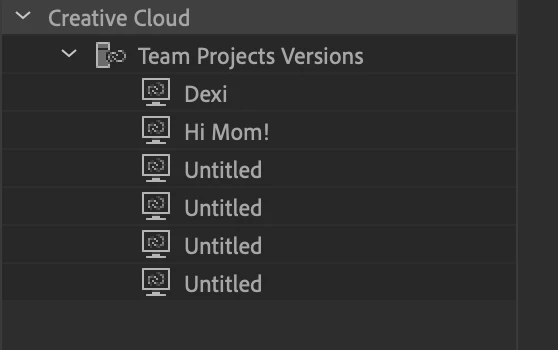
Hi - Recently noticed this (see screenshot below) in my media browser.  These are old and I don't recall ever making them 'Team' projects.  I've tried to delete them but there is no option to do so; Edit -> Team Project options are greyed out.  They are non-existent and can't be located.  Any advice on how to elimiate them from my meda browser tree?  Thanks in advance!
 

    This topic is closed to new replies. Start a new post to keep the conversation going.
    Lewiscat
    LewiscatCorrect answer
    Inspiring
    Oct 31, 2022 2:42 PM UTC

    Thanks for confirming - Premiere used to erroneously display Rush projects in the Media Browser.

    - Udo 


    Hi Udo - Yes, you're correct!  As an update to this thread, I had to delete old Rush projects; the items then disappeared from my home screen.  This is the correct solution.  The upgrade did NOT eliminate the team projects; deleting from via Rush on my iPhone did.  Thanks again.

    5 replies

    Nate Boerman
    Participating Frequently
    Oct 24, 2022 3:18 PM UTC

    Hi there,

    You can usually archive/delete team projects from the manage team projects dialog.  This can be accessed from the file // open team projects dialog. 


    Best,

    Nathan

    Translate
    Lewiscat
    LewiscatAuthor
    Inspiring
    Oct 24, 2022 7:56 PM UTC

    Thanks for your response Nate.  The team projects listed in my Media Browser tree don't exist.  Nothing is found for the assets etc...  When I try to open one, there is no option to archive or delete in the dialog; no project appears in the archive dialog:   They just appear in the Media Browser...   


    Translate
    Lewiscat
    LewiscatAuthor
    Inspiring
    Oct 25, 2022 10:45 PM UTC

    Looks like with the latest upgrade to PP 2023 my Team Project versions disappeared.. this is good!  Thanks again.

    Translate