


Participant
August 24, 2021
Question

Open Auto-Save Error - Team Project - Error Code: -1

  • August 24, 2021
  • 2 replies
  • 577 views

Hi!


I've been having problems accessing my team project.

Yesterday I've shared it successfully as I usually, but then when I wanted to access it this afternoon this happens:
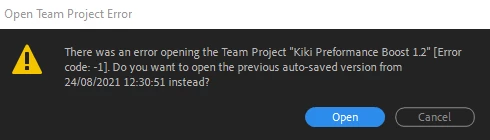
 

When I press open, this happens:
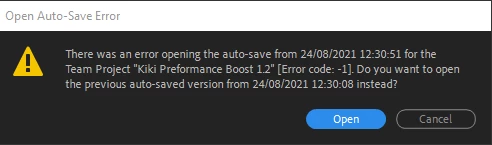
It just goes on and on like that, never opening.

What is this fix to this annoying bug?


Thanks!


[Moderator note: this has been moved to the best forum.]

This topic has been closed for replies.

2 replies

Inspiring
September 22, 2021

Thanks for posting. The exact same thing happened to me today.

Participant
August 24, 2021

OK I found a fix which is not really a fix. It is a way to revert to a previous version that you shared.

1. Open a new project or any project that you like. It doesn't really matter because it is just a way to access the media browser.

2. Go to "Media Browser"

3. Under creative cloud, click on "Team Project Versions"

4. right click on your project and click on "team project versions..."

5. select an earlier version and press "browse"

6. right click again on your project and select "New Team Project From Version..."

7. Save it and open it.


Worked for me, though I lost half an hour of work which is not that great of a loss.

I hope Adobe will repair this bug, but in the meantime - share your team project regularly!