


Participant
February 1, 2024
Question

Opening Team project error

  • February 1, 2024
  • 2 replies
  • 228 views

I'm currently using a team project, but today, suddenly, I received a message like the one in the image, and I haven't been able to open the team project all day. Other people who started the team project before me are still able to use it, but since this morning, I've been getting the same message and can't open the project. When I click to confirm that I want to load the auto-save, it tells me to try again because of a network error, but there haven't been any network errors on my Max Studio, and none of the computers in our office are experiencing network issues.


first message
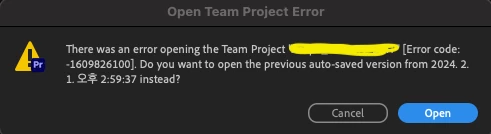
when i click open button


next message



**Please understand that I am Korean and am conveying my words through translation.

Thanks

This topic has been closed for replies.

2 replies

Udo Pawlik
Community Manager
Community Manager
February 12, 2024

Hi @film vending machine 

It might help to refresh the local project file (.tpr) which can be found at the path for Team Projects Auto Save preference.

Close Premiere and move the existing '[projectName].tpr' file to a temp location. Restart Premiere and open the troublesome Team Project, the .tpr file will be re-created based on the cloud version. Please, let me know if the markers are still missing.


Best,

Udo

Udo Pawlik | Sr Software Product Quality Specialist | Adobe | upawlik@adobe.com

Participant
February 1, 2024

new message new error code....
This issue is causing me a lot of stress