


Participant
July 29, 2021
Question

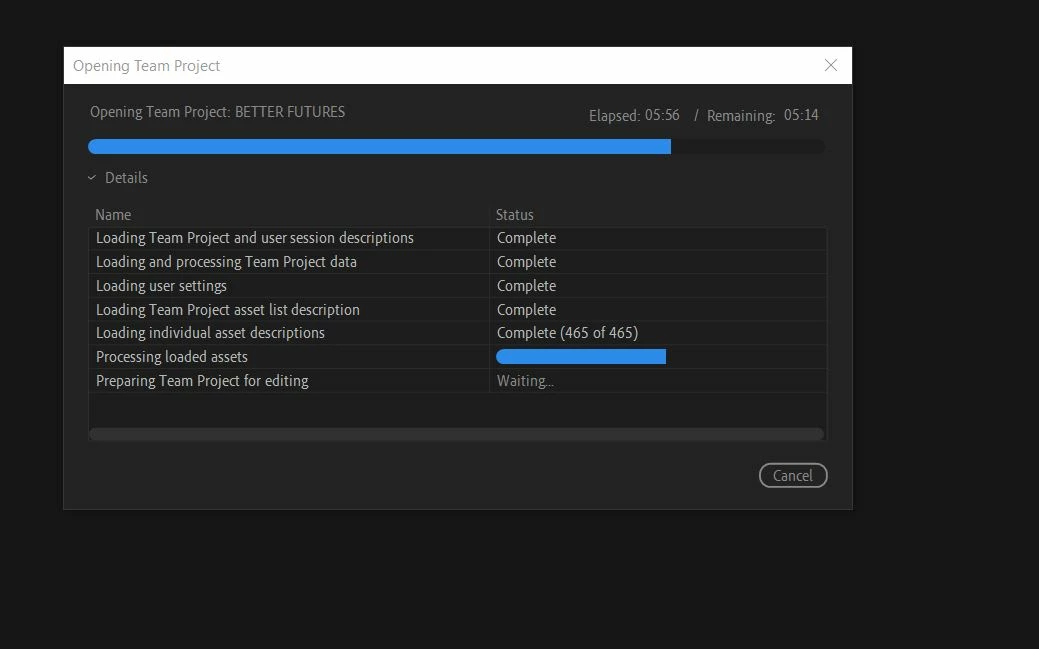
Team project loading assets issue

  • July 29, 2021
  • 1 reply
  • 368 views

Hi all,

I was working on team project and today Premiere crashed during the export one of the episodes. Nothing new for Adobe but this time when I wanted to open a team project again I couldn't. In the loading window, loading stops in "processing loaded assets". I did everything that I found here like opening a new team project and copy-paste the last version bla bla bla but doesn't work.  All posts about this issue were from 2018 so I hope there is some newer update about it. 
This topic has been closed for replies.

1 reply

Adobe Employee
July 29, 2021

[Moved post from Premiere Pro to Team Projects Community]

Hi Vedran, 

Sorry for your troubles with Team Projects. Can you try to roll back to a previous Version or Auto-Save of this particular Team Project?
To do so:

  1. Open any (Team) Project
  2. Open the Media Browser window and select the affected Team Project (Creative Clouds > Team Project [Versions/Auto Saves])
    - Versions are created everytime any collaborator shares changes to the Team Project
    View versions of team projects 
    - Auto-Saves are user-specific and created for every edit on your machine
    View auto-saves


If you're still blocked, could you also invite myself (upawlik@adobe.com) to the Team Project?

Best,
Udo

Udo Pawlik  |  Sr Software Product Quality Specialist |  Adobe  |  upawlik@adobe.com