


Participant
April 3, 2018
Question

"Team Project - Local Changes" Error

  • April 3, 2018
  • 2 replies
  • 1547 views

I have an editor who was working with me on a Team Project and then when they went to push their changes they received this message.
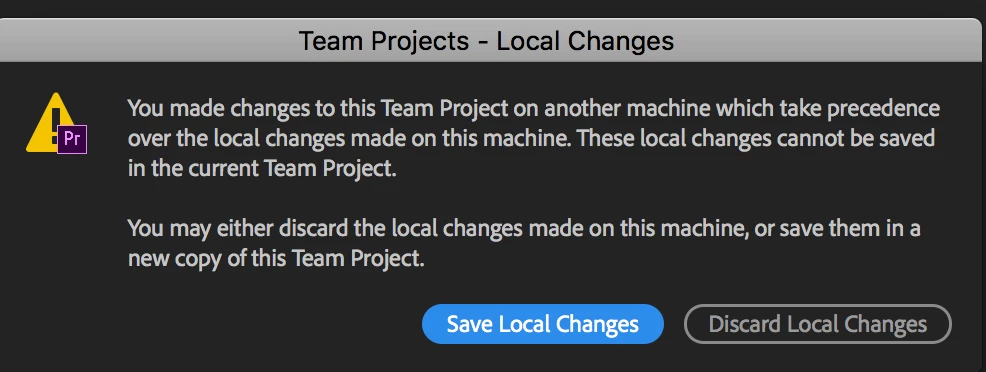
When he clicks "Save Local Changes" it makes him save it as a new copy, if he chooses "Discard Local Changes" it closes without saving.

Since receiving this message he's:

  • Closed and re-opened the team project.
  • We made sure my both of our machines were running on the same version of Premiere CC
  • Computer Restart
  • Uninvited, and re-invited him to the Team Project. However he's unable to make work in the same Team Project.

There are a total of four editors on this project and only one editor seems to have this issue.

[Here is the list of all Adobe forums... https://forums.adobe.com/welcome]

[Moved from regular Premiere Pro to Team Projects... Mod]

    This topic has been closed for replies.

    2 replies

    PeterELee
    Adobe Employee
    Adobe Employee
    April 3, 2018

    The most common cause of that error message is that the same Team Project has been edited on two different machines using the same Adobe ID, and edits were made on one machine before it has incorporated the changes from the other. Is there any chance that two collaborators are inadvertently using the same Adobe ID to edit the Team Project?

    It's also possible, but less common, to get into that state if you've got a Team Project open in two applications at once on a single machine, say After Effects and Premiere, and you make edits it in both. Normally, each application will grab the latest changes to the Team Project when you switch to that application. If you edit very quickly after switching, before the application has had a chance to update everything, you might see that dialog. Or if the update is taking an unusually long time to process.

    Is it possible that either of those is the case?

    Participant
    April 6, 2018

    "The most common cause of that error message is that the same Team Project has been edited on two different machines using the same Adobe ID."

    • So this user had issues pushing their changes, then they logged out of creative cloud and when they logged back that's when they started receiving this message.

    "Is there any chance that two collaborators are inadvertently using the same Adobe ID to edit the Team Project?"

    • Double checked and no they are not.

    "It's also possible, but less common, to get into that state if you've got a Team Project open in two applications at once on a single machine, say After Effects and Premiere, and you make edits it in both"

    • No, it's not open in two projects, our Motion Graphic designer did have it open on her machine, using her ID, but the main editor didn't have it open.

    As of right now he just exported it and is working on his own project.

    PeterELee
    Adobe Employee
    Adobe Employee
    April 9, 2018

    Thanks for the update. When he has a chance, can you have the editor who is having these problems quit any Adobe video apps, then rename the directory "~/Library/Application Support/Adobe/Common/Team Projects Local Hub" to something else, launch Premiere, then try to open the Team Project again? He will lose access to all but the most recent auto-save when he does this, but it may get him unstuck.

    If that does the trick, could you have him compress the original Local Hub directory and then DM me for details on where to send it?

    Thanks again for helping us track this down.

    John T Smith
    Community Expert
    Community Expert
    April 3, 2018