


Team Project Question: Disappearing Markers and Label Color Reversion
Hello, everyone!
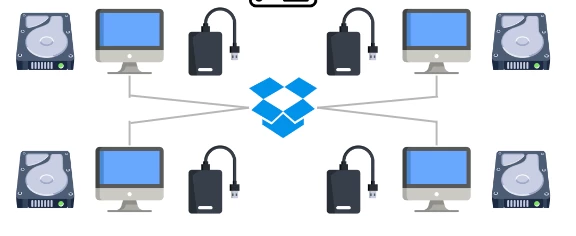
I'm currently post supervising an independent feature doc with a small team of four. For our workflow, we've landed on using Premiere's Team Project functionality, with each user having their own scratch disk and media drive pair (the latter syncing via Dropbox so we all share exact mirrors at all times).
So far, all has ran smoothly, but we have had an issue that we thought was a one-off glitch start to rear its head more and more: markers are disappearing or reverting to the default label color.
We've tried reverting settings back to default, fresh Premiere installs, generating a new Team Project, enabling "Write Markers to XMP", and reingesting the source media with "Generate XMP on Import" enabled, etc. and it still keeps happening on sporadic clips once every few days.
Considering that our editor is spending entire days marking source clips, each loss has been like a sucker punch. We've, thankfully, been able to check auto-saves on the machine doing the marking, and can sometimes recover some lost markers that way, but it hasn't been foolproof.
Apologies for the lengthy post, but I've gone back and forth with Adobe Support a few times (who have acknowledged that they've heard of this happening before) to no avail, so I figured I'd see if anyone else had come across this issue. I had a realization yesterday that there may be some XMP overwriting happening, due to the media drives syncing across all users, but technically the latest version of the XMP should always take priority, so I'm not 100% that's the issue. If it is, does anyone know of a way to write XMPs to a different location, not alongside the media files? No idea if that would help.
Thanks in advance! First-time posting, so please be kind, haha.
Additional details:
We're all on Premiere 24.3.0 (Build 59)
We're all on different Adobe Creative Cloud accounts, not using the same account across multiple licenses, etc.
The issue happened on the first day of the project (March 29th) and then again about a week later.
We're all on at least M2 Pro Apple products (MacBooks, Mac Studio, etc.) except for one M3 machine.
All scratch disks, peak files, media caches, etc. are pointing to individual project drives per user that are not synced with any other user.
The markers don't appear to be falling off of any particular codec or filetype, seems to be quite agnostic to format of media.
We are marking the source files and not any timelines.
Here's an image of the drive configuration, if it helps:
 AdChoices