


seánr68445451
Participant
December 17, 2018
Question

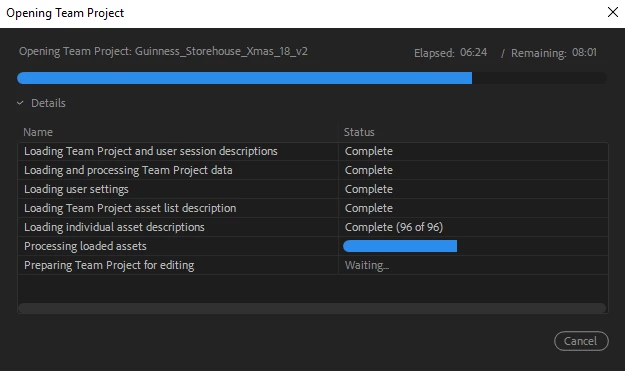
Team Project stuck on "Processing loaded assets"

  • December 17, 2018
  • 2 replies
  • 866 views

Hi, I am trying to open a team project in 2018. The project gets to the "processing loaded assets" section where it just seems to stop loading. I have tried opening it in 2019 to no avail also tried opening it from the other collaborator's computer which also did not work. I have waited over 2 hours on the computer and have tried restarting the computer and the project.

I also can't open the project through the media browser tap in Premiere or create a new team project from the auto-saves.

Any advice on how I can open this project as I need to work on it today, it is time sensitive?
This topic has been closed for replies.

2 replies

PeterELee
Adobe Employee
Adobe Employee
December 17, 2018

Very interesting. The fact that you can import sequences via the Media Browser implies to me that there's a problem with a single asset, or maybe a small number of them. Have you tried creating a new Team Project and just importing everything from the main project? If that works, I would close the new project and make sure that it can open successfully, but perhaps that will get you past the block. I'll reach out via DM to see if we can isolate the problem further.

PeterELee
Adobe Employee
Adobe Employee
December 17, 2018

I'm not sure what would be causing this issue. What happens when you try to create a new Team Project from an Auto-Save? Did you try using the slider to go back a few steps in the auto-save history? Also, what happens when you try to open the Team Project from the Versions tab of the Media Browser? Does it not open at all, or do you get stuck in the same place in the Progress dialog? Are you able to open other Team Projects successfully?

I also can't open the project through the media browser tap in Premiere or create a new team project from the auto-saves.

seánr68445451
Participant
December 17, 2018

Hi,

The same issue happens when I try create a new project from autosaves. The version tab does not work either. I get stuck in the same spot with any attempt I try. I am able to open other team projects its just this one that seems to have stuck. It basically stops loading but the counters still go up so I know it is not frozen.

I was able to import individual sequences into a different project but can't actually open my main project.