


abbeyh22089809
Participating Frequently
November 30, 2016
Question

Team Projects Connection Lost

  • November 30, 2016
  • 2 replies
  • 5338 views

I have been working on a team project in After Effects since last week. Yesterday the file stopped giving me the option to share my changes. I have not closed the file, for fear of losing all my work, and I had been able to render out fine - just not able to save/share changes.
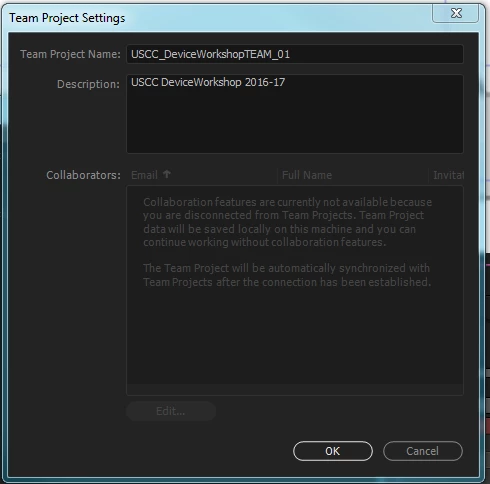
In my team project settings it says that I am disconnected from Team Projects. How do I reconnect?
    This topic has been closed for replies.

    2 replies

    Participant
    December 6, 2016

    I had the same issue. Uninstalling and reinstalling has fixed the issue. But now I'm wary that it could happen again any time, and because you cant collect the project and turn it into an offline version, i'm stuck...

    Allowing us to save out to a regular AE file would be am immediate improvement while this issues are worked out.

    Participant
    February 23, 2024

    2024 and here I am facing the same issue, been. thinking to transition into other editing software haha

    Udo Pawlik
    Community Manager
    Community Manager
    February 26, 2024

    Sorry for your troubles. most likely due to a temporary server outage or a stale process. 
    Let me know if the issue is still happening.

    Best,
    Udo

    Adobe Employee
    December 1, 2016

    Hi,

    There might be different reasons of this behavior.

    1. You got disconnected from internet. I am sure you might already have verified this. If not, this is one of the reasons.
    2. If the case is not internet, then there might be the case where the owner (user who created the Team Project) of the Team Project has removed you from the Team Project. If you are not the owner of the Team Project, you will have to contact the owner and resolve the issue with him/her so that you can collaborate on that team project. To check if you have been removed from team project, you need to check the icon at the bottom left of the Team Project panel. And check its tool tip. It should be something like this.
    3. Another reason could be that the owner has Archived the team project. Again you will have to contact the owner.
    4. If any of the reasons mentioned above does not apply here, then we might have got an issue to look at.

    I would again request you to check the icon and its tool tip at the bottom left of Team Project panel. If the above tool tip is not there, then you will have something like this.

    If this is the case, then we don't know if your team project has been archived or we have got some other issue. One workaround would be to quit your application and make sure the process with name "Team Project Local Hub" is also killed. If it does not terminate within a couple of seconds, please forcefully terminate it. Then relaunch your application and open the same team project and see if you still have this issue.

    Also please could you also tell if you are able to create a new Team Project?

    Also may I request you to share the following files with me so that we can look into more details:

    MAC:

    1. /Users/<user_name>/Library/Preferences/Adobe/Team Projects Local Hub/1.0/logs/

    Windows:

    1. C:\Users\<user_name>\AppData\Roaming\Adobe\Team Projects Local Hub\1.0\logs\

    Hope this helps.

    Thanks,

    Ramesh.

    abbeyh22089809
    Participating Frequently
    December 1, 2016

    Hello! Thank you for your response.
    1. I am connected to the internet.
    2. I am still listed as a collaborator.

    3. It has not been archived.
    4. I do not have any icon or tool tip in the bottom left of the project panel. I think the screen shots you included may be from premier, not after effects?

    I do not want to quit the application as I would potentially lose all my work.

    I do not want to create a new team project as I would loose what I am currently working on.

    Here are my logs:

    Team Projects Local Hub Log.txt - Google Drive

    Team Projects Local Hub Log-last.txt - Google Drive

    Adobe Employee
    December 1, 2016

    Hi,

    In After Effects, this icon would be there at the top right corner (just above the Info panel if you are in Essentials workspace in After Effects).

    2. I am still listed as a collaborator.

    Where did you see if you are listed as collaborator? On your machine or some other user's machine.

    Thanks for the logs. I will send this to the team for further investigation.

    Thanks,

    Ramesh.