I am also facing this strange issue. Yes, we can use the web version, and even open in our favorite browser, but may be a failure to even QA this with certain versions of Windows. We expect better from Adobe (I think). Is there any response from Adobe on this, like updates. or are we still just waiting on a fix?
I hope you are doing well, and we’re sorry for the trouble you had.
We have reported this issue to the product team for further investigation. They are working on identifying the root cause and a fix. I may contact you via email or private message if we need any additional information for further investigation.
Also, could you please collect the logs from the affected machine and share them with us?
I just had some luck after a chat session with support. I uninstalled and reinstalled Acrobat and clicked through the intro screens. Then did a repair in the app and it seemed to work fine.
After removing Acrobat completely and reinstalling and changing the settings to use old UI and working with the software for a bit with no issues, I tried switching back to new UI and the software now seems to be stable and working as normal with the new UI and latest version running 25.001.21223. Still not sure why it was causing so many issues initially.
Here are the issues that I was experiencing today
Abobe Acrobat Professional as part of Creative Cloud
Dell precision 7960 Tower workstation
4K screen at 3840×2160 (100% scaling)
System updated acrobat this morning after clicking on a PDF and updated the software
Initially it came up as normal with the menu and document window but at full screen
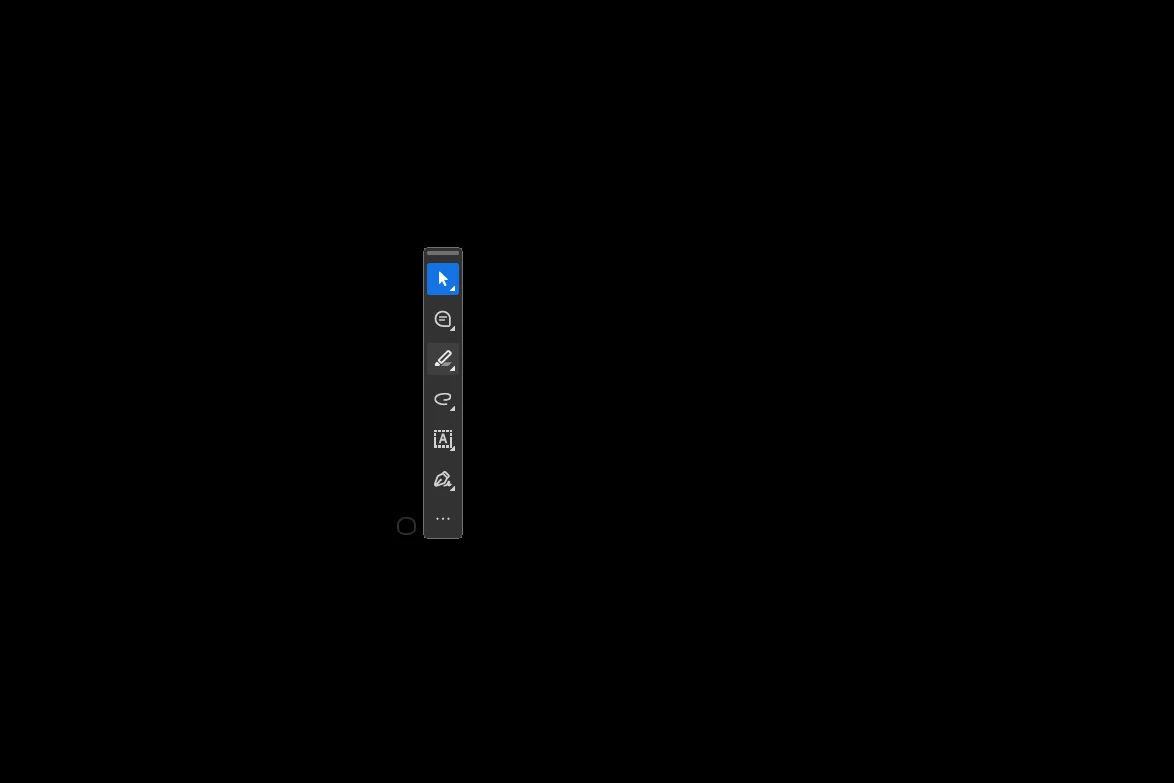
I tried resizing the window and everything disappeared except a small faint circle and the tool bar window
I couldn’t get the menus or document to show (full screen preview did show the document) but it then reverted to this strange circle and tool panel.
I attempted various fixes including repair and reinstall – same issue.
Eventually I removed it through creative cloud and reinstalled it and before the menu and document window disappeared again I changed to ‘disable new acrobat’
Note
The version that installed that was causing the issue is 25.001.21223 (initally had to run it with old UI to have a functional program)
It was running version 25.001.21184 with new acrobat UI just fine previously.
Screen shot above of what it was displaying as you can see no active document window is accessible and the menus are gone, only the weird circle and tools panel.




 AdChoices