Axtten1
Participant
February 18, 2026
Question

Acrobat 25.1 update - opens tool bar but no document, can't access menus or document

  • February 18, 2026
  • 37 replies
  • 30417 views


37 replies

callyourcomputerguy
Participant
February 20, 2026

You can resolve by hovering over the icon for adobe on your taskbar, right clicking on the preview window, then selecting Maximize. 

So far on the 2 I’ve encountered this seems to have resolved permanently. 


TaosBrit
Participant
February 21, 2026

Yes, except that the document then opens in full screen mode, hiding everything behind it. Minimizing the screen loses the document again.

Participant
February 21, 2026

This is how I fixed it, and the PDF’s open in a normal window now.

Do what ​@callyourcomputerguy said to get it full screen, then drag the window off to the side, then drag it back any where on the desktop (it will look like the toolbar again). But when you drop it down, it will now have a little white box on screen, drag the corners out until the window is visible.

I’m guessing this was “vibe coded” and no one checked the code properly.

AHill1821
Participant
February 20, 2026

Same problem.  Please post the answer here when it is figured out.

Wynn-WynnConsulting
Participant
February 21, 2026

See the comment above your post.

rameshrathour
Participant
February 23, 2026

this worked for me for adobe 25.001.21223, only the weird circle issue.
delete registry "HKEY_CURRENT_USER\Software\Adobe\Adobe Acrobat\DC\SDI"

David5E37
Participant
February 20, 2026
INITIAL CALL:
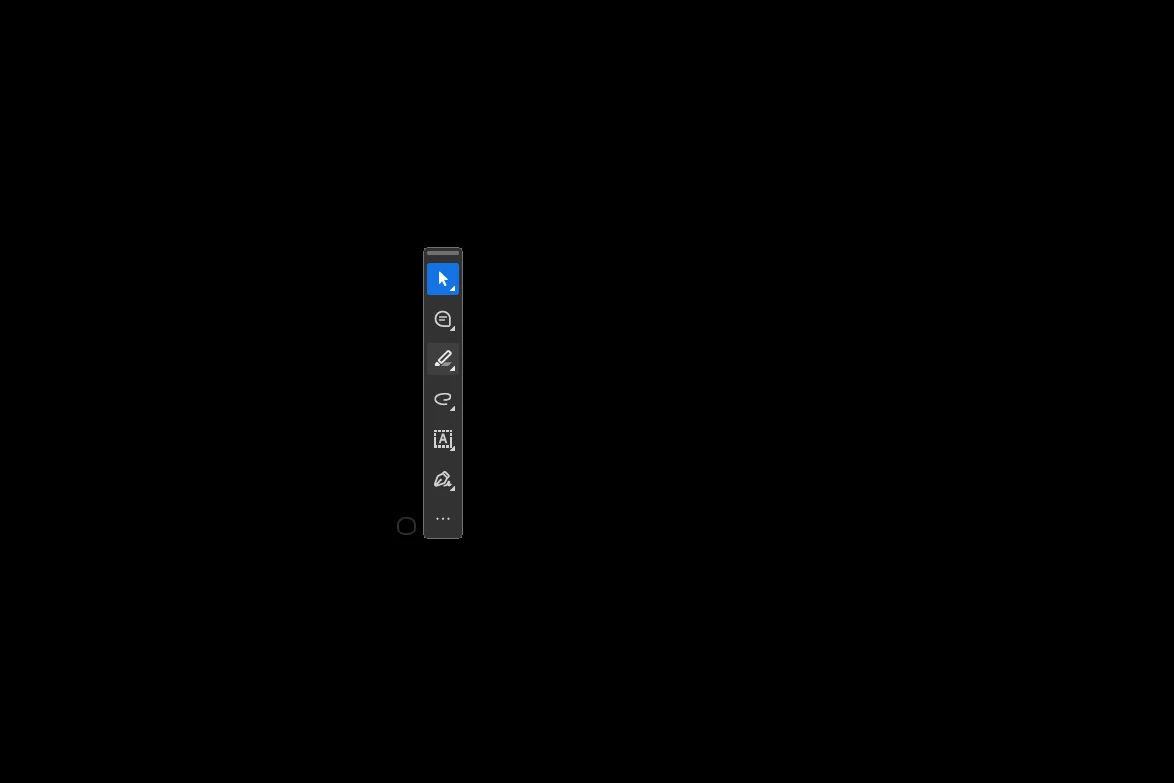
 - User reached out over MS Teams, relating that Adobe Acrobat was not working.  A portion of the toolbar was all that was showing when launching .PDF files.
 - Reboots did not help.
 - I called user and remoted in.
 - We recreated the issue, where when launching Adobe, only this appeared: 
attachment?token=eyJ0eXAiOiJKV1QiLCJhbGciOiJIUzI1NiJ9.eyJpZCI6MTcwODY1ODkwODksImRvbWFpbiI6ImN1bW1pbmcuZnJlc2hzZXJ2aWNlLmNvbSIsInR5cGUiOjF9.rkAvNPDxoANoq1gZ10lsA05KpnGgEID93n9qFj66hYI
 
 
  - After relaunching, we noticed a small semi-transparent circle, analogous to a soap bubble:
attachment?token=eyJ0eXAiOiJKV1QiLCJhbGciOiJIUzI1NiJ9.eyJpZCI6MTcwODY1ODkyNzQsImRvbWFpbiI6ImN1bW1pbmcuZnJlc2hzZXJ2aWNlLmNvbSIsInR5cGUiOjF9.vqdO_ZfIY4-ns6Zy3mE-pIPAz4-d-lm0UGCfz2w4etA
 
  - Hovering over the upper left corner of the object just right, we were able to get the "expand arrows" to appear:
attachment?token=eyJ0eXAiOiJKV1QiLCJhbGciOiJIUzI1NiJ9.eyJpZCI6MTcwODY1ODkzOTcsImRvbWFpbiI6ImN1bW1pbmcuZnJlc2hzZXJ2aWNlLmNvbSIsInR5cGUiOjF9.oNbiKMUH8V-DOja_D2Abss6Otcc-qjvYo-qifhBMqSM
 
  - Dragging this out resulted in the Adobe Acrobat toolbars looking normal.
  - We opened and closed Adobe Acrobat 3 times to test, including opening a .PDF from an email, and the issue is so far resolved.
Nadine23270779hkfj
Participant
February 20, 2026

thank you!!  that works

Participant
February 21, 2026

RIDICULOUS

AHill1821
Participant
February 20, 2026

Same problem.  Please post the solution here when it is found.

rameshrathour
Participant
February 23, 2026

it worked for me for adobe 25.001.21223, only the weird circle issue.
delete registry "HKEY_CURRENT_USER\Software\Adobe\Adobe Acrobat\DC\SDI"

David5E37
Participant
February 20, 2026
INITIAL CALL:
 - User reached out over MS Teams, relating that Adobe Acrobat was not working.  A portion of the toolbar was all that was showing when launching .PDF files.
 - Reboots did not help.
 - I called userand remoted in.
 - We recreated the issue, where when launching Adobe, only this appeared: 
attachment?token=eyJ0eXAiOiJKV1QiLCJhbGciOiJIUzI1NiJ9.eyJpZCI6MTcwODY1ODkwODksImRvbWFpbiI6ImN1bW1pbmcuZnJlc2hzZXJ2aWNlLmNvbSIsInR5cGUiOjF9.rkAvNPDxoANoq1gZ10lsA05KpnGgEID93n9qFj66hYI
 
 
  - After relaunching, we noticed a small semi-transparent circle, analogous to a soap bubble:
attachment?token=eyJ0eXAiOiJKV1QiLCJhbGciOiJIUzI1NiJ9.eyJpZCI6MTcwODY1ODkyNzQsImRvbWFpbiI6ImN1bW1pbmcuZnJlc2hzZXJ2aWNlLmNvbSIsInR5cGUiOjF9.vqdO_ZfIY4-ns6Zy3mE-pIPAz4-d-lm0UGCfz2w4etA
 
  - Hovering over the upper left corner of the object just right, we were able to get the "expand arrows" to appear:
attachment?token=eyJ0eXAiOiJKV1QiLCJhbGciOiJIUzI1NiJ9.eyJpZCI6MTcwODY1ODkzOTcsImRvbWFpbiI6ImN1bW1pbmcuZnJlc2hzZXJ2aWNlLmNvbSIsInR5cGUiOjF9.oNbiKMUH8V-DOja_D2Abss6Otcc-qjvYo-qifhBMqSM
 
  - Dragging this out resulted in the Adobe Acrobat toolbars looking normal.
  - We opened and closed Adobe Acrobat 3 times to test, including opening a .PDF from an email, and the issue is so far resolved.
AHill1821
Participant
February 20, 2026

The bubble with the arrows worked for me.  But did revert, and had to do it again.  

AWEB01
Participant
February 20, 2026

Hello, can Adobe please reach out to me as well when this is fixed? This is causing workplace delays in not being able to access PDFs. 

rameshrathour
Participant
February 23, 2026

below worked for me for adobe 25.001.21223, only the weird circle issue.
delete registry "HKEY_CURRENT_USER\Software\Adobe\Adobe Acrobat\DC\SDI"

Sandeep Nagaraj
Adobe Employee
Adobe Employee
February 23, 2026

Another Workaround :

  1. Open Acrobat app
  2. In the task bar > Hold shift key + Right Click (Acrobat Icon) > Select the Maximize option
  3. Once the app is opened > Hover the pointer to Maximize/Restore option (one in the middle) > Cascade the window to the left
  4. Once this is done > Close the app
  5. Relaunch the app

    Hope this helps. 
jrubeo
Participant
February 20, 2026

I just resolved the issue for a user.

  • Launch Acrobat with an existing PDF. 
  • Press CTRL+ALT+SPACE to open a window menu.
  • Click Maximize and Adobe will display the UI.
  • Click the menu and then click ‘Disable New Acrobat’
  • Let it reload and then click View > Enable New Acrobat (if you want)

After that it he was back to using his paid spyware.

Jenny Prather
Participant
February 20, 2026

I cannot access any of my files that I have saved under Adobe. I have this at the top of my folder . If I scroll over the word ERROR it shows me this : View cloud storage information. What is going on. I have never had this issue since I bought this in 3/2025

Jenny Prather
Participant
February 20, 2026

Also when I scan my invoice it will not show me the view. If I go to the folder and I click on the files they act like they are going to open up but the do not! 

conner.welker
Participant
February 20, 2026

This issue is affecting users in my organization as well. I’d like to be able to give them a notification once the issue is resolved and an update to fix it is available.

362338037i8y
Participant
February 20, 2026

Is there any ETA of this getting fixed?  I’ve tried unistalling and reinstalling 3 times didn’t work.

AnandSri
Legend
February 20, 2026

Hello ​@362338037i8y 


I hope you are doing well, and sorry for the trouble. The team has identified the root cause, and is working on the fix which is getting tested internally. I will share more details via direct/private message.


 

Thanks,

Anand Sri.