

Acrobat and Reader DC now supports Apple Silicon M1 processors
Now run Acrobat and Reader DC natively on Apple Silicon M1 processors
Acrobat now supports Apple devices with Apple Silicon M1 processors. Apple Silicon devices ship with Rosetta 2 - an emulator that enables ARM Macs to run Intel-based apps.
With the September 2021 release, you can run Acrobat DC and Acrobat Reader DC (version 21.007.20091) natively on Apple computers with Silicon M1 processor with 1.5X the speed of Rosetta emulation mode. You can now choose to run Acrobat in either native Apple Silicon mode or the Rosetta emulation mode.
How to enable Acrobat DC or Acrobat Reader DC to run in native mode?
- Launch the application and go to Acrobat > Preferences.
- Under Categories, choose General.
- Then mark the box for “Enable native OS mode for optimal performance” in the Application Startup section.
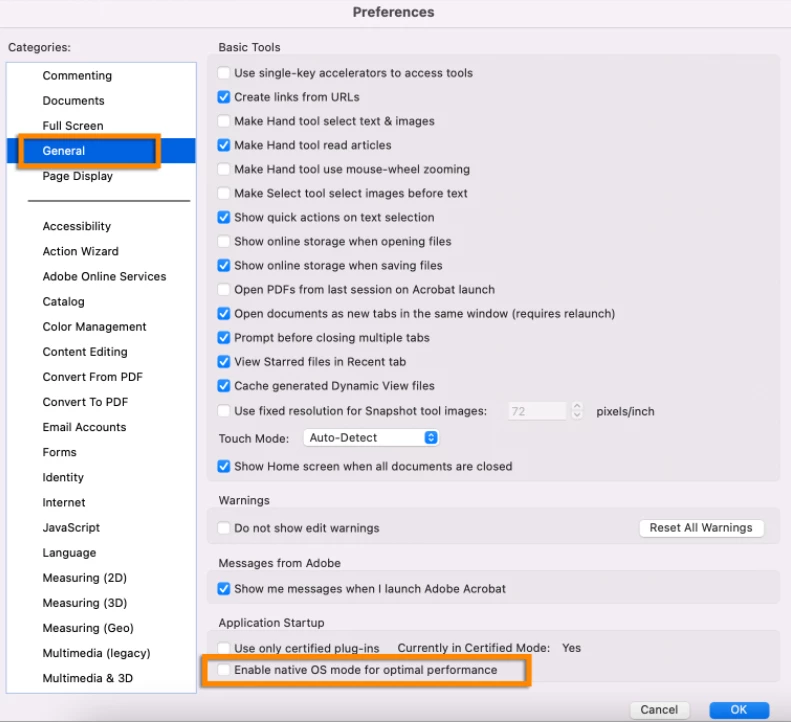
- Click on the OK button to save the changes and relaunch the application.
Note: Classic versions of Acrobat - Acrobat Pro 2017 and Acrobat Pro 2020 currently do not support native mode.
For more information, see Apple Silicon M1 processor support | Acrobat DC and Acrobat Reader DC
To know about other Adobe applications, check the help document for Apps that run natively on M1 computers.
Did you find it helpful? If yes, share your experience with us: Join the conversation here. We are listening!
To discover a host of other great features – Go straight to: Save PDF form as read only copy using Fill & Sign | New Preference option to use filename as the document title in Acrobat/ Reader


 AdChoices